The Filmmaker's Complete Guide to AI & Virtual Production: From LED Volumes to AI Post-Production Tools
The Filmmaker's Complete Guide to AI & Virtual Production: From LED Volumes to AI Post-Production Tools
Executive Summary
Alright, let's talk about the seismic shift happening in our industry. For years, we've been pushing the boundaries of what's possible with cameras, lenses, and lighting, meticulously crafting every frame. But now, we're facing a new frontier: AI and Virtual Production (VP). This isn't just about a green screen upgrade; it's a fundamental reimagining of the filmmaking pipeline, from concept to delivery. LED volumes, real-time rendering, and AI-powered creative and post-production tools aren't just buzzwords, they're technologies that are already reshaping budgets, creative workflows, and even the very definition of a "set." This guide cuts through the hype to give you the practical, on-the-ground insights you need as a professional filmmaker to navigate this evolving landscape, understand the technical nuances, and leverage these powerful tools without losing the soul of your storytelling. We're going to dive deep into the hardware, the software, the creative implications, and the inevitable challenges, because whether you like it or not, this tech is here to stay, and understanding it is no longer optional.
Table of Contents - The Shifting Tides: Why AI and VP Are Inevitable - Unpacking Virtual Production: The LED Volume Ecosystem - The Science of the Wall: LED Panel Technology - Software and Processing: The Brains Behind the Operation - Camera Tracking and Calibration: The Crucial Sync - Pre-Production in the Age of VP and AI - Virtual Scouting and Location Building - Storyboarding and Previs with AI Assist - Budgeting and Scheduling: New Variables - On Set with LED Volumes: Practical Considerations and Workflow - Lighting Challenges and Opportunities - Camera Choices and Lens Properties - The VP Crew: New Roles and Skillsets - The Performer's Experience - AI in Post-Production: From Rough Cut to Final Polish - Automated Editing and Assembly - Color Grading and Visual Effects Enhancement - Sound Design and Audio Sweetening - AI for Creative Ideation and Asset Generation - Concept Art and Mood Boards - Scriptwriting and Dialogue Assistance - Digital Humans and Synthetic Performers - The Ethical and Economic Landscape of AI in Film - Job Displacement vs. Skill Evolution - Copyright, Ownership, and Compensation - The Authenticity Debate: Preserving the Human Touch - Real-World Case Studies and Future Outlook - The Mandalorian and the Rise of ICVFX - Indie Filmmakers Embracing Immersive Tech - What's Next: The Horizon of Possibilities - Next Steps for the Forward-Thinking Filmmaker
---
The Shifting Tides: Why AI and VP Are Inevitable
Look, I've been on sets for a while now, grinding it out, perfecting the craft. I've seen a lot of "next big things" come and go. Green screen was a game-changer, sure, but it was always a compromise. You shot against this flat, one-color vacuum, and then spent months in post-production trying to make a digital world feel real. The actors were performing to air; the DP was lighting a blank canvas. It worked, but it was never truly cinematic in the moment.
That's where Virtual Production, particularly with LED volumes, steps in. It's not just an evolution; it's a revolution in how we capture real and virtual elements in camera. Suddenly, your actors have a real environment to react to, your gaffer has actual interactive light sources to work with, and as a DP, you're not just guessing what the real environment will be in post. You're seeing the final image, or a damn close approximation of it, right there on set. That's monumental. It's taking the guesswork out of the most crucial creative decisions and pushing those decisions earlier into the pipeline.
And then there's AI. This isn't just about deepfakes and sci-fi tropes anymore. We're seeing AI integrated into every stage of filmmaking, from pre-visualization and script analysis to automated editing and high-fidelity asset generation. Imagine generating hyper-realistic concept art in minutes, or having an editing assistant that can pull compelling takes based on emotional analysis, or even creating entire digital extras with convincing performances. We're not talking about replacing human creativity, but augmenting it, giving us tools that can handle the tedious, time-consuming tasks and free us up to focus on the truly creative endeavors.
The reason these technologies are inevitable isn't just because they're cool, although they are. It's because they address fundamental pain points in traditional filmmaking: cost, time, and creative iteration. Building practical sets is expensive and time-consuming. Location shooting is fraught with logistical nightmares and unpredictable variables like weather and daylight. Post-production for complex VFX can drag on for months, blowing budgets and pushing release dates. Virtual production and AI offer ways to mitigate these challenges, allowing for unprecedented creative control, faster iteration, and often, significant cost savings in the long run.
Think about the economics. Studios are constantly looking for efficiency. If an LED volume can reduce travel, eliminate costly set builds that are only used for a few days, and drastically cut down on post-production VFX hours because so much is captured in-camera, that's a massive win for the bottom line. For indie filmmakers, while the initial investment in a volume might be steep, access to these stages is becoming more democratized through rental houses, and the AI tools are increasingly accessible on a subscription model, bringing Hollywood-level capabilities within reach. We're entering an era where the lines between production and post are blurring, and creative decisions are happening earlier and with greater fidelity than ever before. We just need to learn how to wield these new tools effectively.
Pro Tip: Don't view VP and AI as replacements for traditional filmmaking. See them as powerful extensions. A solid understanding of traditional lighting, composition, and storytelling is still your bedrock. These new tools simply give you more ways to apply that knowledge.
Unpacking Virtual Production: The LED Volume Ecosystem
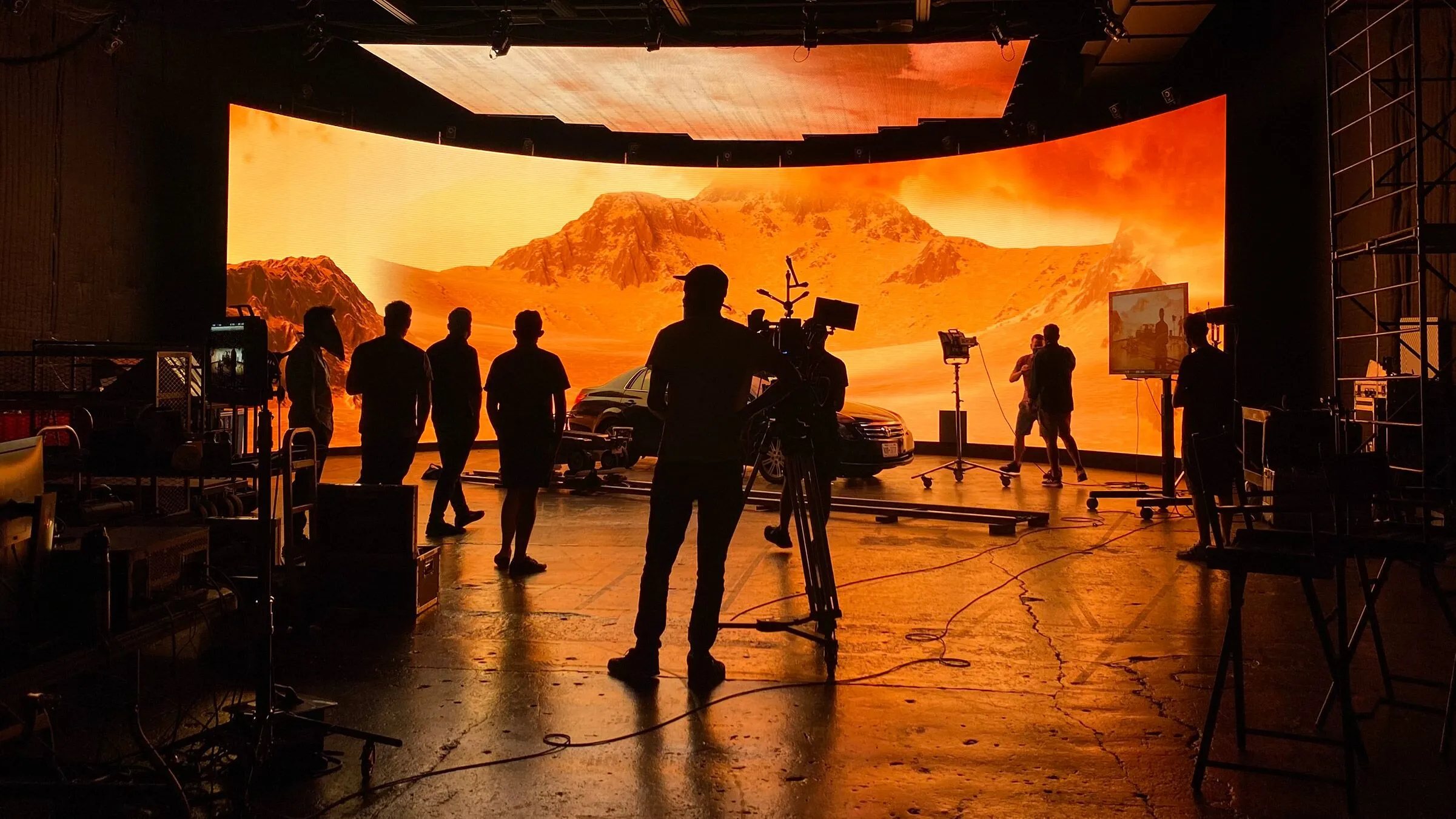
Okay, let's get down to the brass tacks: what is an LED volume, and what makes it tick? When most people picture Virtual Production, they're probably thinking of the massive, curved LED screens made famous by The Mandalorian. And that's largely correct. But it's not just a big TV screen; it's a complex, interconnected system of hardware and software designed to render real-time virtual environments that react dynamically to the camera's position and movement.
At its core, an LED volume (also known as an ICVFX stage, or In-Camera Visual Effects stage) wraps a live-action setting in a photorealistic digital world. This allows us to capture reflections, interactive lighting, and backgrounds directly within the camera, making it look like the actors are physically present in the virtual environment. It's a huge leap from shooting on a green screen, where all those elements are added later, often with less convincing results.
The Science of the Wall: LED Panel Technology
First, the panels themselves. Not all LED walls are created equal. We're not talking about those concert screens with big chunky pixels. For ICVFX, you need high-resolution, high-refresh-rate panels with specific color characteristics.
* Pixel Pitch: This is critical. It's the distance between the center of one LED cluster (or pixel) and the next. The smaller the pixel pitch, the higher the resolution and the closer the camera can get without seeing individual pixels. In 2026, we're commonly seeing 1.5–1.8mm pixel pitch panels becoming the standard on mid-tier stages, with sub-2mm now expected for main "performance walls" where the actors are. Just a year ago, 2.3mm or 2.8mm was typical for this purpose. For ceiling panels or side walls that are further from camera, you might still use 2.3mm or 2.8mm pitch to save some cost without sacrificing quality. This rapid improvement in pixel density is making LED volumes increasingly versatile and forgiving. * Brightness and Color Fidelity: These panels need to output serious light to match the intensity of on-set practicals, especially when you're dealing with bright virtual skies. You're looking for panels capable of 1500-2000 Nits or more, with excellent color rendition (high CRI/TLCI) and a wide color gamut to match your camera's capabilities. We're trying to create a seamless blend, and if your virtual environment doesn't look like it belongs in the same world as your actual subjects, it breaks the illusion. * Refresh Rate: This is where things get really technical. If the refresh rate of the LED panels doesn't match or exceed the camera's frame rate, you'll get banding, flicker, or artifacting, especially with high shutter speeds. We're talking 3840Hz or higher refresh rates on these panels these days to ensure clean footage even at 1/1000th of a second shutter speed. You also need to consider genlock synchronization between the camera, the LED processors, and the rendering engine to eliminate tearing and ensure smooth image capture. This stuff gets granular.
Software and Processing: The Brains Behind the Operation
The fancy LED wall is just a display. The real magic happens with the software and the powerful custom hardware driving it.
* Real-time Engines: This is the heart of it all. Unreal Engine and Unity are the dominant players here. They render the 3D virtual environment (your set, your alien planet, your fantastical forest) in real time. As your camera moves, the engine calculates and displays the correct perspective on the LED wall, maintaining parallax and a sense of depth. This demands serious GPU power, often racks of high-end NVIDIA GPUs, to crank out those pixels at 60fps or higher while maintaining photorealism. What's exciting in 2026 is the integration of real-time AI enhancements directly into these engines—plugins from AMD, NVIDIA, and others are now offering on-the-fly AI upscaling and denoising, reducing on-set capture demands and significantly cutting post-processing time. * Media Servers and LED Processors: These bridge the gap between the game engine and the LED panels. Media servers (like disguise or NovaStar) take the rendered output from the game engine and distribute it across the thousands, sometimes millions, of individual pixels on the LED wall. The LED processors then take that signal and translate it into the specific data packets the panels understand, handling things like color calibration, brightness uniformity, and individual panel mapping. This is where you iron out any inconsistencies across the massive screen. * Content Creation: You're not just plugging in a JPEG. The virtual environments themselves are 3D assets, built by environment artists using tools like Maya, Substance Painter, Blender, and Photogrammetry software. This content needs to be optimized for real-time rendering, meaning careful polygon counts, optimized textures, and efficient lighting calculations. It's a whole discipline in itself, and it often requires game development expertise.
Camera Tracking and Calibration: The Crucial Sync
This is arguably the most critical component for maintaining the illusion of depth and interactivity.
* Optical Tracking Systems: Systems like Mo-Sys StarTracker (what I usually see) or Ncam use optical markers or inertial sensors attached to the camera, feeding its exact position and orientation back to the real-time engine. This data allows the engine to adjust the perspective of the virtual background instantaneously. If the tracking is off by even a tiny bit, the parallax breaks, and the illusion shatters. * Lens Calibration: Equally important is knowing your lens. Every lens has unique distortion characteristics, and the game engine needs to compensate for these in order to render a perfectly distortion-matched background. Special calibration processes are done for each lens and focal length combination to create a precise "lens profile." Without this, the background and foreground won't line up, especially at wider angles. * Volume Calibration: The entire LED volume itself needs to be meticulously calibrated. This involves precisely mapping the physical dimensions of the LED panels in 3D space to the virtual camera's perspective. It's a precise art and science, making sure the digital world aligns perfectly with the physical space.
It's a truly intricate dance. One faulty link, one miscalibrated sensor, and the whole illusion can crumble. That's why having a dedicated, experienced VP crew is non-negotiable on these sets. You're not just working with a DP and a gaffer anymore; you're working with a VP supervisor, a real-time artist, a tracking technician, and usually someone from the LED vendor. It's a whole new branch on the crew tree.
Common Mistake to Avoid: Underestimating the need for seamless data flow. If your camera tracking isn't robust, or your genlock isn't solid, you'll be fighting artifacts and broken parallax instead of focusing on performance and composition. Invest in the best tracking system you can afford for your critical shots.
Pre-Production in the Age of VP and AI
Pre-production. The unsung hero of filmmaking, where all the creative and logistical heavy lifting happens long before "Action!" is called. With Virtual Production and AI, this stage isn't just evolving; it's being fundamentally transformed, offering unprecedented levels of creative control and problem-solving. This is where you win the battle, not on set.
For years, we'd draw storyboards, do blockouts, maybe some basic animatics. Then, on set, you'd discover your planned shot doesn't work with the sun's position, or the set piece is too small, or the actor can't quite hit their marks. Now, much of that uncertainty can be ironed out months in advance.
Virtual Scouting and Location Building
Remember those endless hours of location scouting? Driving around, taking photos, trying to imagine how a shot would look. It's still necessary for practical locations, sure, but for any fantastical or highly specific environment, virtual scouting is a game-changer.
* Virtual Environments as Recce Tools: Instead of flying a whole team halfway across the world, you can build a highly detailed 3D model of your desired location, whether it's a bustling cyber-punk city, an ancient alien temple, or a desolate moonscape, and "scout" it from your desk. You can fly a virtual camera through the environment, experiment with time of day, weather conditions, even change architecture or add elements on the fly. This saves immense time and money. Photogrammetry and Lidar: For real-world locations that need to be replicated or virtualized, technologies like photogrammetry (using multiple photos to create a 3D model) and lidar scanning (using laser pulses to measure distance and create detailed maps of terrain and objects) are becoming indispensable. You scan a real location, then bring that hyper-accurate 3D model into your real-time engine for virtual scouting, planning camera movements, and identifying potential issues before* anyone steps foot on a physical set. It's like having a perfect miniature set to play with, scaled up to real life. * Democratization: Smaller productions can leverage existing asset libraries (Unreal Engine Marketplace, KitBash3D) or even use AI to generate base environments. You won't have the custom-built fidelity of a blockbuster, but you can achieve remarkably convincing results for a fraction of the traditional cost.
Storyboarding and Previs with AI Assist
This is where AI really starts to shine as a creative partner. Pre-visualization (previs) is nothing new, but AI is supercharging it.
* AI-Powered Concept Art and Video: Need a thousand different variations of a spacecraft bridge or a medieval castle? Instead of waiting for a concept artist to render a few options over days or weeks, AI image generators (like Midjourney, Stable Diffusion, or DALL-E) can churn out hundreds of ideas in minutes, based on text prompts or even rough sketches. This speeds up the ideation phase tremendously, allowing directors and production designers to explore far more concepts than ever before. But here's what's changed dramatically in 2026: generative video models have matured significantly. Tools like Runway Gen-4+, Kling 2.x, Luma Ray, Sora 2, and Google's Veo 3 can now reliably produce cinematic video clips with better motion consistency, native audio generation, and even camera controls. This means you can generate moving background plates, environment extensions, or complete animatic sequences that can be directly imported into Unreal Engine for VP previs. We're talking about creating rough motion tests of a scene in hours, not weeks. * Automated Previs Animation: Tools are emerging that can take a script and automatically generate basic animatics, blocking out character movements and camera positions based on dialogue and stage directions. While still being refined, these provide a fantastic starting point for human animators. Imagine feeding your script into an AI and getting a rough video previz back an hour later—that's now a reality for many productions. * Virtual Camera and Blocking: In a real-time engine, you can use a virtual camera (often an iPad with an AR overlay, or a more sophisticated physical controller) to "shoot" your scenes within the virtual environment. This allows the director and DP to try out different camera angles, lens choices, and blocking for actors without any physical constraints. You see the shot in perfect perspective, with virtual lights, and iterate until it's perfect. This detailed planning means fewer surprises on the day and a much more efficient use of expensive LED volume time.
Budgeting and Scheduling: New Variables
The financial aspect of filmmaking is always a puzzle, and VP and AI introduce new pieces and new strategies.
Cost Efficiency in the Long Run: While the upfront cost of an LED volume rental can seem high (think $20,000 to $100,000+ per day* for a top-tier stage, excluding crew), it can drastically reduce expenses in other areas. No location permits, no international travel for scouts, fewer physical set builds, and significantly reduced post-production VFX time and costs if plates are captured in-camera. The calculation isn't simple; it's a trade-off analyses. For highly VFX-dependent films, the cost savings can be enormous. * New Line Items: You'll see new positions on your budget: VP Supervisor, Real-Time Artist, Tracking Tech, Virtual Art Department (VAD). These are crucial roles that didn't exist in traditional budgets. Their expertise is what makes the technology work. You're trading traditional set dressers and construction for game engine programmers and 3D artists. * Scheduling Optimization: Because so much can be "pre-shot" and rehearsed in the virtual environment, actual shooting time on the LED volume can be highly efficient. You can shoot different "locations" in rapid succession by simply loading new environments. This allows for fewer shooting days compared to traditional multi-location shoots, which can balance out the daily cost of the volume. Moreover, bad weather, sun position, and time of day are no longer logistical headaches, as they can all be controlled virtually.
This intensive pre-production process using VP and AI isn't just about saving money; it's about making better creative decisions earlier. It ensures that when you step onto that LED stage, you're not just hoping for the best; you've already "shot" the film a dozen times over, virtually perfecting every angle, every lighting cue, and every transition.
Pro Tip: Don't skimp on your Virtual Art Department (VAD). The quality of your 3D assets and environments directly dictates the believability of your ICVFX shots. A beautiful physical set is art; a beautiful virtual set is often even more complex art.
On Set with LED Volumes: Practical Considerations and Workflow
Okay, you've done your previs, your virtual sets are dialed in, and now you're finally stepping onto an LED volume. This is where the rubber meets the road, and where all that pre-production planning pays off. But even with perfect planning, shooting on a volume is a beast of its own, blending traditional cinematography with advanced real-time tech.
My first time on a proper LED stage? It was like being on a spaceship, all these screens and specialists, very different from a dusty soundstage. The potential was immediately obvious, but so were the new challenges.
Lighting Challenges and Opportunities
This is arguably the biggest game-changer for cinematographers. With a green screen, you light your subject, and that's it. Any interactive light from the environment is added later, often with a lot of guesswork and never quite feeling right. With an LED volume, the background is a light source.
* Interactive Lighting: The environment displayed on the LED wall automatically provides realistic interactive light to your actors and practical set pieces. If your virtual scene has a bright red sunset, that red light will spill onto your actor's face and reflect in shiny surfaces, just like it would in the real world. This is phenomenal for realism and significantly reduces the need for complex practical lighting setups to mimic environmental light. Supplementing the Volume's Light: While the volume provides interactive light, it's rarely enough to be your only light source for your subjects. LED panels, even bright ones, typically emit diffuse light. You'll still need traditional hard lights, key lights, and fills to shape your actors' faces, create motivated shadows, and add cinematic punch. However, your traditional lights now need to complement and integrate* with the ambient and interactive light coming from the volume. This means careful color temperature matching and intensity balancing. * Controlling Reflections: This is a big challenge. The LED wall is a giant, bright screen. If your subject is too close, or if you have highly reflective surfaces in your foreground (glass, metal, glossy costumes), you'll see reflections of the LED panels themselves. This is where physical blockers, careful camera angles, and sometimes strategic placement of practical props or set pieces become crucial. Sometimes, you might even have to dial down the brightness of parts of the background not directly in frame to avoid unwanted reflections. It's a constant negotiation. * The Dome/Ceiling: Many high-end volumes have LED ceiling panels, or sometimes large softboxes above, to provide realistic overhead environmental light. This is incredibly effective for creating skylight, or integrating into indoor scenes.
Pro Tip: Don't rely solely on the volume for talent lighting. Use traditional cinematic lighting techniques to sculpt your subjects, then let the volume do the heavy lifting for environmental interaction and background illumination. It's a dance between the two.
Camera Choices and Lens Properties
While many cameras can work on an LED volume, some are definitely better suited.
* Sensor Size and Dynamic Range: The higher the dynamic range, the better your camera can handle the contrast between your lit subject and the often-bright LED background. Large format sensors (like those found in ARRI Alexa LF, RED V-Raptor, Sony VENICE) excel here, offering shallow depth of field which can help separate your subject from the LED wall, making the virtual environment more convincing. But be careful: too shallow a depth of field can reveal the pixel structure on the LED wall if the background elements are crucial focal points. * Global Shutter: This is increasingly a desirable feature. Rolling shutters can cause problems like "jello" artifacts or banding when shooting rapidly changing imagery on the LED wall, especially if there's any slight mismatch in refresh rates or sync. Cameras with global shutters (like the ARRI Alexa 35, Sony VENICE 2 with certain sensors, or RED Komodo) eliminate these issues, ensuring clean, artifact-free images of the LED screen. * Lens Selection: Fast cine primes are often preferred for their optical quality and ability to create beautiful shallow depth of field. Wide-angle lenses, however, can be tricky. While they offer epic scope, they also make it easier to see the edges of the LED volume unless it's very large, or reveal pixel structure if you get too close. Your lens calibration profiles (remember those from previs?) are vital for avoiding distortion issues here. You'll be working closely with the VP team to ensure proper lens data is flowing to the engine.
The VP Crew: New Roles and Skillsets
You're adding an entirely new department, or at least several new crucial roles, to your set.
* Virtual Production Supervisor: This person is the overall lead, bridging the gap between the director/DP's creative vision and the technical capabilities of the volume. They oversee the real-time artists, tracking, and content optimization. They are essentially the "DP" of the virtual world. * Real-Time Artist / Engine Operator: These are the people driving the Unreal Engine or Unity. They're changing environments, adjusting virtual lighting, making real-time tweaks to asset placement, and responding to creative requests from the director. They are like the gaffer and production designer of the virtual world, working at light speed. * Tracking Technician: Responsible for maintaining the camera tracking system, ensuring its accuracy, and troubleshooting any issues. Without precise tracking, the whole illusion falls apart. * LED Technician: From the vendor, managing the LED panels themselves, ensuring uniform brightness, color, and patching any dead pixels.
Your traditional core crew, DP, Gaffer, Key Grip, 1st AD now needs to collaborate intimately with this new VP team. Communication is paramount.
The Performer's Experience
This is a huge win for actors. Instead of staring at a tennis ball on a stick or a blank green wall, they are immersed in the environment. They see the alien landscape, they see the fiery explosion, they see the vast city. This enhances their performance significantly, allowing for more natural reactions and blocking.
* Spatial Awareness: Actors have a real sense of space and scale, making their movements and eyelines more authentic. * Interactive Reference: They can react to interactive lighting and visual cues from the environment, leading to more nuanced performances.
But it can also be overwhelming. The bright screens, the constant ambient light, the sheer scale of it. Directors need to be mindful of this and guide their actors through the process, just as they would any new type of set. It's part of the job of getting a great performance.
On-set with an LED volume is a high-wire act, a symphony of technology and creativity. When it works, it's breathtakingly effective and liberating. When it doesn't, it's a costly headache. That's why the investment in skilled personnel and robust pre-production is non-negotiable.
Common Mistake to Avoid: Forgetting that traditional filmmaking rules still apply. Don't let the technology overshadow basic cinematic principles of blocking, composition, and performance. The best VP shots look effortless, not like a tech demo.
AI in Post-Production: From Rough Cut to Final Polish
Post-production has always been the realm where the footage gets shaped, polished, and transformed. Now, AI is not just assisting but actively contributing, revolutionizing how editors, colorists, sound designers, and VFX artists work. This isn't about replacing human artistry, but about automating the tedious, repetitive tasks, allowing us to focus on the truly creative, high-level decisions.
I've spent countless hours in an edit suite, eyes going blurry trying to find the perfect take or manually rotoscoping a fussy element. The idea that AI can take some of that grunt work off my plate? That's not just exciting, it's a potential sanity-saver.
Automated Editing and Assembly
This is perhaps one of the most intriguing and contentious areas of AI in post. The idea of an AI making creative editorial decisions can feel unsettling to editors, but the reality is more about intelligent assistance.
* First Pass Assembly: AI tools are emerging that can analyze a script, match dialogue to takes, and cut a preliminary "assembly" edit. They can use metadata (like camera angles, actor emotion, even vocal inflections) to suggest optimal takes and build a rough sequence. While it won't replace a human editor's creative vision, it can provide a powerful starting point, speeding up the initial ingest and organization phases significantly, especially on dialogue-heavy projects. * AI-Powered Shot Selection: Imagine an AI that can review all your takes and highlight the "best" for specific criteria: a precise emotional beat, a perfectly delivered line, or a visually compelling moment. Some tools analyze facial expressions, body language, and even audio cues to help editors sift through hours of footage more efficiently. This frees the editor to focus on storytelling, pacing, and rhythm, rather than just searching. * Multi-cam Sync and Grouping: This is already becoming standard. Tools like DaVinci Resolve and Adobe Premiere Pro use AI to automatically sync multi-camera footage by analyzing audio waveforms. This saves editors countless hours of manual syncing, especially on shoots with many cameras and fragmented audio. * Transcription and Subtitling: AI-powered transcription services are incredibly accurate now, providing instant, time-coded transcripts of all dialogue. This is invaluable for editors searching for specific lines, creating subtitles, or generating captions for accessibility.
Color Grading and Visual Effects Enhancement
AI is proving to be an invaluable assistant in the highly technical and artistic world of color and VFX.
* Automated Color Correction: While a human colorist's eye is irreplaceable for creative grading, AI can perform initial color balancing, white balancing, and even exposure correction across entire scenes or even reels. This provides a clean, neutral starting point for the colorist, saving them hours on mundane adjustments. Some tools can also learn a specific look or LUT and apply it intelligently across different shots, compensating for exposure variations. * Intelligent Rotoscoping and Masking: This is a huge one for VFX. Traditionally, rotoscoping complex shapes (like hair or intricate movements) frame by frame is extremely tedious. AI-driven rotoscoping tools, utilizing machine learning, can now often isolate subjects from their backgrounds with remarkable accuracy in a fraction of the time. Similarly, intelligent masking tools can track objects or subjects, simplifying tasks that used to require meticulous manual keyframing. * Generative Fill and Content-Aware Tools: Tools like Adobe's Content-Aware Fill (and others) can intelligently remove unwanted objects from a shot, fill in missing background elements, or extend frames with convincing results. This is invaluable for removing boom mics, crew members, or unwanted modern elements from historical scenes. * Upscaling and Denoising: AI algorithms are now incredibly good at upscaling lower-resolution footage to higher resolutions with impressive detail retention, and at intelligently removing digital noise without sacrificing image quality. In 2026, these capabilities have been integrated directly into real-time engines with plugins from AMD and NVIDIA, meaning you can apply AI upscaling and denoising during capture on an LED volume, not just in post. This reduces on-set technical demands and significantly cuts post-processing time. Depth Estimation and Relighting: Advanced AI can analyze a 2D image or video to create a 3D depth map, allowing for virtual relighting or depth-based effects in post. This means you could potentially adjust the lighting on a subject or in a scene after* it's shot, to a certain extent, without needing expensive 3D reconstruction.
Sound Design and Audio Sweetening
The audio post-production world is also seeing significant AI integration.
* Noise Reduction and Restoration: AI-powered tools are incredibly effective at cleaning up dialogue, removing background hums, fan noise, wind noise, or even complex environmental sounds with minimal impact on the desired audio. This saves audio engineers countless hours on manual repairs. * Dialogue Isolation and Enhancement: AI can intelligently separate dialogue from music and sound effects, making it easier to isolate, clean, and enhance spoken words. This is crucial for clarity, especially in challenging recording environments. * Automated Mixing: While a final mix still requires human ears, AI can perform preliminary mixing tasks, balancing levels, applying basic compression, and even suggesting EQ settings based on analysis of the sonic landscape. * Generative Sound Effects: Just as AI can generate images, it can also create sound effects from text prompts. Need the sound of a "futuristic spaceship landing on a jungle planet"? AI can generate a library of options, complete with variations. This isn't about replacing Foley artists, but about providing starting points and filling gaps efficiently.
The overarching theme here is automation of the mundane, liberation of the creative. AI takes away the tedious tasks, the frame-by-frame chores, and the endless searching, allowing post-production professionals to dedicate their mental energy to the nuanced, artistic decisions that truly shape the final film.
Common Mistake to Avoid: Over-relying on AI for creative decisions. AI is a tool, not a director or an editor. Always use your artistic judgment to guide and refine AI's output. It's about augmenting human capability, not replacing it. The AI can give you a dozen versions, but you still need to pick and refine the best one.
AI for Creative Ideation and Asset Generation
Beyond the production and post stages, AI is becoming a powerful engine for pure creative ideation and asset generation. This is about sparking imagination, rapidly prototyping visual concepts, and even creating entire digital personalities. It challenges our traditional understanding of authorship and intellectual property, but its potential to accelerate and broaden the creative process is undeniable.
I've always believed the best ideas can come from anywhere. Now, "anywhere" includes a bunch of algorithms crunching data. It's a surreal feeling to type a few words and see something entirely new manifest visually, almost instantly.
Concept Art and Mood Boards
This is one of the most immediately impactful applications of generative AI.
* Rapid Visual Exploration: Imagine an art director needing to visualize a fantastical creature, a unique architectural style for an alien civilization, or the mood of a specific historical period. Traditionally, this would involve days or weeks of a concept artist's time, iterating on sketches and paintings. With tools like Midjourney, Stable Diffusion, or DALL-E, you can generate hundreds of high-quality images in minutes. By providing text prompts (e.g., "gothic cathedral submerged in bioluminescent ocean, intricate details, moody lighting, wide shot, cinematic"), artists can explore radically different concepts and aesthetics at an astonishing pace. * Iterative Design: The value isn't just in generating images, but in the rapid iteration. You generate a batch, pick the most promising, refine the prompt (e.g., "make it more ethereal," "add a steampunk element," "change the color palette to sepia"), and generate again. This loop allows for a much more thorough exploration of visual ideas before committing to a specific design. It's like having a lightning-fast visual collaborator. * Mood Board Amplification: Forget just pulling images from Pinterest. AI can generate custom mood board elements that perfectly capture the desired tone, color scheme, and texture for a scene or an entire film. This streamlines communication between departments, ensuring everyone is aligned on the visual language.
Pro Tip: Treat AI image generation as a brainstorming partner, not a final artist. The best results often come from using AI outputs as a strong foundation that human artists then take over to refine, add unique details, and infuse with artistic intention. Give it a distinctive style brief, iterate, then step in with the human touch.
Scriptwriting and Dialogue Assistance
While fully AI-written screenplays are still arguably in their infancy regarding true narrative depth and emotional resonance, AI is increasingly valuable for specific aspects of script development.
* Dialogue Generation and Polishing: AI language models (like ChatGPT, Claude) can assist with dialogue, generating options for specific character voices or situations. They can help polish clunky lines, suggest alternative phrasing, or even craft banter for minor characters. For example, "Write a sarcastic response from a grizzled detective to a rookie's naive question about the case." * Synopsis and Outline Creation: AI can quickly summarize existing scripts, create loglines, or rough out scene outlines based on high-level plot points. This is useful for getting a quick overview or testing narrative structures. * Character Backstories and Worldbuilding: Struggling to flesh out a minor character's past or invent details for a fictional culture? AI can generate detailed backstories, cultural norms, or technological descriptions based on your initial prompts, serving as a creative spring board. * Script Analysis: AI tools can analyze scripts for pacing, dialogue density, character consistency, and even estimate shooting days or budget implications based on scene complexity. This offers valuable insights during the development phase.
Common Mistake to Avoid: Expecting AI to deliver a fully-formed, emotionally resonant screenplay. AI is excellent at pattern recognition and text generation, but it lacks true understanding of human experience, subtext, and the subtle nuances of storytelling that define great writing. It's a superb assistant, not a ghostwriter.
Digital Humans and Synthetic Performers
This is perhaps the most advanced and ethically complex area of AI for asset generation.
* Hyper-realistic Digital Doubles: We've seen digital doubles for years in VFX, but AI is making their creation faster, more realistic, and more cost-effective. AI can analyze numerous scans and performances of an actor to create a highly accurate digital counterpart that can be used for stunts, de-aging, or even entire performance sequences where the original actor isn't available. This is how we get young Luke Skywalker or convincing historical figures. * Synthetic Actors: This is where it gets really interesting - and a little unsettling. AI can now generate entirely new, photorealistic digital human characters ("synthetic performers") that don't exist in the real world. These digital actors can be rigged, animated, and even voiced by AI, offering unprecedented control over appearance, age, and performance without the logistical complexities or costs associated with real actors. Companies like Particle6 are already showcasing their capabilities in creating "digital actress Tilly Norwood," for instance. * Voice Synthesis and Deepfakes: AI voice synthesis has reached a point where it can convincingly clone a person's voice from a short audio sample. This allows for dialogue changes in post-production without needing to re-record actors, or for creating performances for synthetic characters. Deepfake technology, while controversial due to its misuse, allows for highly realistic face-swapping and manipulation of video likeness, which can be applied to digital doubles or synthetic performers to achieve specific looks or performances. * Ethical Considerations: This area is rife with ethical quandaries, as highlighted by Hollywood's concerns during recent strikes. Issues of actor likeness rights, perpetual usage (e.g., an actor's likeness being used long after their death), and the potential for deepfake misuse are paramount. Compensation models, consent, and clear guidelines are urgently needed.
The ability to generate incredibly lifelike digital entities, complete with performances and voices, opens up massive creative possibilities, but also demands a serious discussion about the future of talent, intellectual property, and the very definition of a "performer." It's not just a technical challenge; it's a societal one.
Pro Tip: Approach digital humans and synthetic performers with immense caution and clarity. Always prioritize ethical sourcing, clear contracts on likeness rights, and transparency with your audience. The technology is powerful, but its impact on human artists and the perception of authenticity is profound.
The Ethical and Economic Landscape of AI in Film
We can't talk about technological advancements in film without addressing the inevitable ethical quandaries and economic shifts they create. AI isn't just a suite of tools; it's a force profoundly reshaping the industry's landscape, impacting everything from job security to artistic integrity and the very concept of authorship.
I've had arguments over coffee with fellow DPs and gaffers about this. Some see opportunity, others see existential threat. The truth, as always, is probably somewhere in the messy middle.
Job Displacement vs. Skill Evolution
This is the elephant in the room. When new technology arrives, particularly one with such broad application as AI, there's a natural fear of job loss.
* Automation of Routine Tasks: AI excels at repetitive, data-driven tasks. This means roles centered purely on data entry, basic rotoscoping, simple background clean-up, first-pass editing assembly, or rudimentary asset creation are most at risk of significant automation. An AI can parse hours of footage for certain criteria in seconds, a task that might take a human editor days. * Creation of New Roles: However, history shows that technological shifts rarely lead to total job annihilation; rather, they lead to job transformation and the creation of entirely new roles. We're already seeing the emergence of Virtual Production Supervisors, Real-Time Artists, Prompt Engineers (for generative AI), AI Data Managers, and AI Ethics Compliance Officers. These roles require a blend of traditional filmmaking knowledge and specialized technical expertise in AI and game engines. Upskilling and Adaptability: The key for many existing film professionals will be upskilling. Editors will need to learn how to guide AI editing assistants rather than just manually cutting. VFX artists will need to leverage AI for initial renders and focus on refinement and complex problem-solving. Cinematographers will need to understand how to light for LED volumes. The demand for creative leaders who can articulate vision and direct AI tools will only grow. It's not about being replaced by AI, but being replaced by someone who knows how to use* AI. * Economic Impact on Labor: The potential for AI to devalue certain skills or drive down wages for entry-level positions is a real concern. If an AI can perform the work of 10 junior roto artists, the demand for those junior artists decreases. This puts pressure on unions and guilds to negotiate protections and ensure fair compensation as these technologies integrate.
Copyright, Ownership, and Compensation
Who owns what AI creates? What about the data used to train the AI? These are open, complex legal questions that are actively being debated and litigated.
* Training Data Scrutiny: Many powerful generative AIs are trained on vast datasets of existing images, text, and audio, much of which is copyrighted material from human creators. The question is whether using this copyrighted material for training constitutes fair use, or if it's infringement. This is a battleground issue, central to the recent WGA and SAG-AFTRA strikes. * Authorship and Ownership of AI-Generated Content: If an AI generates a piece of concept art or a script outline, who owns it? The person who wrote the prompt? The developer of the AI? The studio that licensed the AI? Current copyright law is struggling to keep up with these nuances. In many jurisdictions, copyright still requires human authorship. * Likeness and Performance Rights: The use of AI to create digital doubles, synthetic performers, or voice clones of actors raises serious questions about their economic rights. Should an actor's likeness be used perpetually without additional compensation? What if a synthetic actor is generated that looks suspiciously like a real one? This was a major point of contention in the SAG-AFTRA strike, with actors demanding consent and compensation for AI usage of their images and voices. * Transparency: There's a growing call for transparency around AI usage in films. Audiences and creators alike want to know when AI-generated content is being used, especially when it comes to human likenesses. This might lead to new disclosures or credits in the form of "AI created/augmented visual effects" etc.
The Authenticity Debate: Preserving the Human Touch
As AI becomes more sophisticated, the question of artistic authenticity looms large.
* The Soul of Storytelling: Filmmaking is fundamentally a human endeavor, rooted in emotion, shared experience, and subjective artistry. Can an AI truly replicate the nuanced vision of a director, the empathetic performance of an actor, or the gut feeling of an editor? Many argue that while AI can create technically impressive outputs, it currently lacks the "soul" or unique perspective that defines great art. * Audience Perception: Will audiences feel cheated if they learn a beloved actor's performance was partly synthetic, or if an entire film was largely AI-generated? There's a potential for a backlash if AI is perceived as devaluing human creativity or being used to cut costs at the expense of genuine artistry. * The Definition of "Filmmaker": As AI integrates, the role of the filmmaker may shift from hands-on creation to more of a conductor - directing AI tools, curating outputs, and making high-level aesthetic decisions. This changes the very nature of what it means to be a "creator." * Risk of Homogenization: If AIs are trained on existing content, there's a risk that they might produce derivative or aesthetically safe outputs, leading to a homogenization of creative styles and an erosion of truly innovative, boundary-pushing art. The unique, idiosyncratic vision of a singular artist might become harder to find if we rely too heavily on algorithmic averages.
Navigating this ethical and economic landscape requires thoughtful dialogue, proactive policy-making, and a commitment from the industry to prioritize human creativity and fair compensation as these powerful tools become more prevalent. It's not just about what we can do, but what we should do.
Pro Tip: Stay informed about the legal and ethical advancements in AI. Join industry discussions, support union negotiations, and advocate for policies that protect human creators and ensure ethical use of AI. Your future, and the future of filmmaking, depends on it.
Real-World Case Studies and Future Outlook
It's easy to get lost in the theoretical "what ifs" of AI and Virtual Production, but these technologies aren't just concepts; they're actively being deployed in some of the biggest and most innovative productions today. Understanding these pioneering efforts helps ground the immense potential in tangible results and offers a glimpse into what's coming next.
I've paid close attention to how these tools are being used, seeing which challenges they successfully tackle and where they still fall short. It's not always glamorous, but the impact is undeniable.
The Mandalorian and the Rise of ICVFX
You cannot talk about LED volumes and Virtual Production without talking about The Mandalorian. It wasn't the first production to use the technology, but it was undoubtedly the one that brought In-Camera Visual Effects (ICVFX) into the mainstream and proved its efficacy for large-scale, fantasy-driven narratives.
A "Proof of Concept" for ICVFX: Before The Mandalorian*, the industry was experimenting with LED walls for backgrounds, but the level of integration, real-time rendering fidelity, and camera tracking synchronization achieved on that show was groundbreaking. They essentially built the template for modern ICVFX stages, demonstrating how to seamlessly blend practical foreground elements with dynamic, rendered virtual environments. * Creative Freedoms: One of the most significant advantages was the ability to rapidly change virtual locations. On one day, they could be on an arid desert planet, and the next, a bustling alien market, by simply loading a new environment into Unreal Engine. This vastly expanded the creative scope and reduced the logistical nightmares and travel costs associated with physical location shooting. * Actor Performance and Interactive Lighting: Directors like Jon Favreau championed the approach because it allowed actors to perform within context, reacting naturally to the surroundings. Crucially, the LED walls provided realistic interactive light onto the actors and props, embedding them organically into the scene, which traditionally would have been a labor-intensive post-production headache. * Iterative Design: The ability to tweak virtual environments, adjust lighting, and even move entire virtual set pieces in real-time meant creative decisions could be made and executed instantly on set, instead of being deferred to post-production. This was a massive win for directorial and cinematographic control.
The success of The Mandalorian wasn't just about cool tech; it was about proving that VP could be a practical, efficient, and creatively superior method for certain types of filmmaking, particularly those heavy in world-building and VFX.
Indie Filmmakers Embracing Immersive Tech
While The Mandalorian had a massive budget, the underlying technologies are becoming more accessible, allowing indie filmmakers to leverage aspects of VP and AI.
* Virtual Scouting Software: Smaller productions can't afford custom LED volumes, but they can afford subscriptions to Unreal Engine or Unity. This means they can still perform virtual scouting, previs, and early blocking within a real-time environment, saving significant time and money on physical location scouting and set builds. They can create their fantasy sets, figure out their camera moves, and essentially "rehearse" the shoot virtually. * Rentable LED Stages: The proliferation of LED volumes means that independent filmmakers can now rent time on a volume for specific, critical scenes, rather than needing to build entire practical sets. A few days on a rented volume can replace weeks of traditional set construction and location shooting for a fraction of the cost. * AI for Asset Creation and Post-Production: This is where indie filmmakers can gain truly significant advantages. Need custom concept art? AI. Need to upscale archival footage? AI. Need to remove a light stand from a shot? AI-powered content-aware fill. Need cheap, high-quality stock environments? Existing 3D asset libraries. These tools democratize high-end visual effects and creative assistance that were once exclusive to big studios. A small team can now achieve results that used to require a massive VFX house budget. * Pre-visualization with Off-the-Shelf Tools: An indie director and DP can block an entire scene using an iPad with AR apps that overlay virtual sets, allowing them to visualize the scene in 3D without any expensive hardware. This level of planning was unthinkable for low-budget films a decade ago.
The barrier to entry for some aspects of VP and AI is significantly lowering, empowering independent creators to punch above their weight.
What's Next: The Horizon of Possibilities
The pace of innovation in AI and VP is breathtaking. What we see today is just the beginning—and the developments in 2026 have only accelerated the trajectory.
* Finer Pixel Pitches and Modular Volumes: Higher-resolution panels with 1.5–1.8mm pixel pitch are now standard on mid-tier stages, and sub-2mm is expected across the board. Perhaps more significantly, modular and portable LED systems—including reconfigurable "dynamic volumes"—are spreading rapidly. This makes VP accessible for smaller productions and enables hybrid on-location setups where portable LED panels or "windows" can be combined with practical locations. You're no longer confined to a fixed stage; you can bring the volume to your location. * Generative Video Maturity: The maturation of AI video tools has been dramatic. Models like Runway Gen-4+, Kling 2.x, Luma Ray, Sora 2, and Google Veo 3 now reliably produce cinematic video clips with better motion consistency, native audio generation, and camera controls. This isn't just for social media content—these tools are being used to generate importable background plates and environment extensions directly into Unreal Engine. You can create rough moving previz, animated sky replacements, or crowd elements in hours rather than weeks. * Real-Time AI Enhancements in Engines: Direct Unreal Engine plugins for AI upscaling and denoising (from NVIDIA, AMD, and others) are now reducing on-set capture demands and post-processing time. You can apply intelligent upscaling during the shoot itself, meaning lower-resolution capture on demanding shots can be enhanced in real-time without visible quality loss. * Hybrid On-Location Approaches: The rigid distinction between "stage work" and "location work" is dissolving. More productions are using portable LED panels or "windows" combined with practical locations, extending VP beyond fixed stages. Imagine shooting in a real forest but with an LED panel providing a consistent sunset that would otherwise be impossible to capture due to weather or timing constraints. * AI-Powered Performance Capture and Animation: AI is increasingly bridging the gap between actor performance and digital characters, allowing for more nuanced and efficient transfer of human motion and facial expressions to digital avatars, blurring the lines further between real and virtual actors. * Predictive AI in Production: AI could analyze scripts and pre-production data to predict potential logistical challenges, budget overruns, or even suggest optimal shooting schedules to maximize efficiency. * Hyper-Personalized Content: While this moves beyond traditional filmmaking, the long-term vision of AI involves creating personalized movie experiences for individual viewers, where storylines, characters, or even endings are dynamically adapted based on viewer preferences. This opens up entirely new models for interactive storytelling. * Hybrid Stages and Dynamic Props: Imagine set pieces that can physically transform based on AI instructions, or practical props with embedded micro-LEDs that can dynamically change texture and appearance to match virtual environments. The blend of practical and virtual will only become more sophisticated.
The future of filmmaking will be a fascinating blend of human artistry and intelligent automation. The core of storytelling, emotion, and human connection will always remain paramount, but the tools we use to bring those stories to life will continue to evolve in ways we can barely imagine today.
Common Mistake to Avoid: Ignoring the technological advancements around you. This isn't a fad; it's the future. Even if you don't become an expert, understanding the capabilities and limitations of AI and VP is crucial for staying relevant and competitive in this rapidly evolving industry.
Next Steps for the Forward-Thinking Filmmaker
Alright, you've read through the technical deep-dive and the ethical considerations. Now what? You can't just passively observe this revolution; you have to engage with it. For professional filmmakers, "standing still" means falling behind. So, here are some actionable next steps to prepare yourself and your craft for the AI and VP-powered future of cinema.
1. Educate Yourself Continuously: This is non-negotiable. * Dive into Real-Time Engines: Download Unreal Engine (it's free for indie use until you hit revenue thresholds) or Unity. Start with basic tutorials. Learn enough to navigate a 3D environment, understand material properties, and play with virtual lighting. You don't need to become a 3D artist, but familiarity is key. * Follow Industry Experts: Seek out cinematographers, VFX supervisors, and VP supervisors actively working with these technologies. Listen to podcasts, watch their presentations, and read their articles. BlockReel DAO is a natural starting point, but expand your network. * Experiment with AI Tools: Play with Midjourney, Stable Diffusion, DALL-E, ChatGPT, Claude. Understand their strengths and limitations for ideation, concept generation, and creative assistance. Try feeding them prompts related to your current projects. And don't overlook the new video generation tools—Runway, Kling, Luma Ray, Sora, and Veo are worth experimenting with for creating previz elements and background plates.
2. Network with VP and AI Specialists: * Find a VP Supervisor: Get to know someone who works on LED stages. They are the new linchpins. Understand their workflow, their challenges, and how DPs effectively collaborate with them. * Connect with Real-Time Artists and 3D Environment Builders: These are the people creating the virtual worlds. Their craft is crucial to the success of any ICVFX project. * Join Online Communities: There are thriving Discord and Reddit communities for Virtual Production, Unreal Engine, and AI generative art. Engage with them, ask questions, and learn from others.
3. Think "Virtual First" in Pre-Production: * Integrate Previs into Your Process: Even on smaller projects, consider how basic previs could inform your shot choices. Can you block scenes in a simple 3D environment? * Start Building Your Own Digital Asset Library: Think about collecting 3D scans of props, textures, or even capturing lidar data of locations you might want to revisit virtually.
4. Embrace New Skillsets, Don't Fear Them: * Develop Your "Prompt Engineering" Skills: Learning how to effectively communicate with generative AI models (writing clear, detailed prompts) is a developing art form and a valuable skill. * Understand Data and Metadata: As AI becomes more integral, understanding how data is organized, tagged, and utilized will be increasingly important for everything from asset management to automated editing. * Consider a "VP Specific" Portfolio Piece: As you learn, try to shoot a small test or even a short scene on an LED wall, if you can access one, or create a compelling AI-generated concept piece. This demonstrates your engagement with the new tech.
5. Engage with the Ethical & Economic Discussions: * Read Up on Copyright Law for AI: Stay informed about how intellectual property is being handled, and what your rights are as a creator. * Support Union Negotiations: If you're unionized, engage with your guild/union about their stance and efforts to protect creators in the age of AI. These fights are critical.
This isn't about throwing out everything you know; it's about adding a powerful new set of tools to your filmmaking arsenal. Storytelling remains paramount. The human element, the emotional connection, the eye for composition, the ability to draw a powerful performance - these are the skills that AI cannot replicate, and they will only become more valuable. These new technologies will free up filmmakers to focus on what truly matters: making great movies.
---
© 2026 BlockReel DAO. All rights reserved. Licensed under CC BY-NC-ND 4.0 • No AI Training. Originally published on BlockReel DAO.