Production Sound Roles: Mixer vs Boom Op vs Utility
---
In This Guide
- Core Responsibilities and Role Distinctions
---
Core Responsibilities and Role Distinctions
The production sound department operates as a specialized unit, each member bearing distinct responsibilities that collectively ensure high-quality audio capture. On union features, particularly those adhering to IATSE Local 695 standards, these roles are clearly defined, minimizing overlap and maximizing efficiency.
The Production Sound Mixer (PM), often referred to as the "Sound Mixer" or "Location Sound Recordist," is the department head. This individual carries the ultimate responsibility for the sonic integrity of the production. Their primary task is to capture, monitor, and mix all on-set audio sources in real-time. This involves making critical decisions about microphone selection, placement, gain staging, and dynamic processing to create a balanced, intelligible mix. The Mixer is responsible for delivering a stereo "mix track" to camera, which serves as a guide for editorial, as well as recording individual "isolated tracks" (ISOs) for every microphone channel.
These ISOs are crucial for post-production, allowing dialogue editors and re-recording mixers granular control over each sound source. The PM also manages the timecode sync for all sound recording devices, ensuring accurate alignment with camera footage. They are the primary liaison with the director and script supervisor regarding sound-related matters, providing feedback on performance levels, environmental noise, and potential audio challenges.
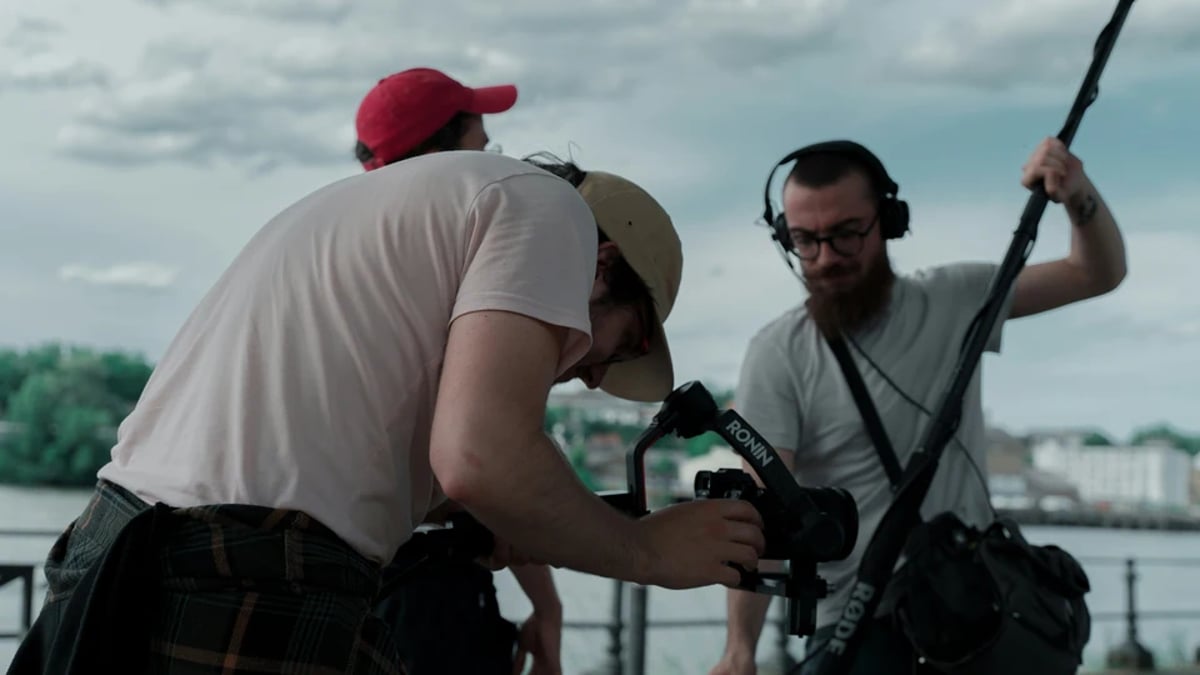
The Boom Operator (BO) is the physical embodiment of precision and agility within the sound department. Their central task is to position the boom microphone as close as possible to the actors' dialogue, always just out of frame, to capture the clearest, most isolated sound. This requires a deep understanding of acoustics, microphone polar patterns, and the subtle interplay of light and shadow on set. A skilled Boom Operator "rides the pole," dynamically adjusting mic position to follow an actor's movement, anticipate dialogue, and avoid casting boom shadows into the shot. They work in close coordination with the camera department and lighting team, often choreographing their movements during rehearsals to ensure unobtrusive operation.
The BO is also responsible for managing the boom pole itself, from selecting the appropriate length and suspension system to ensuring its silent operation.
The Utility Sound Technician (UT), or simply "Utility," is the jack-of-all-trades, providing essential support to both the Mixer and the Boom Operator. Their duties are diverse and critical for smooth operation. The Utility is typically responsible for wireless microphone setup and management, including hiding lavalier microphones on actors, coordinating wireless frequencies, and monitoring battery levels. They handle all cabling, ensuring clean runs that are out of the way of other departments and safe for foot traffic. Timecode distribution and synchronization across all recording devices and cameras often fall under the Utility's purview, as does the deployment of "plant mics" (microphones strategically hidden within the set or props).
On smaller productions or when a second boom is required, the Utility may also act as a secondary Boom Operator. Their role demands technical proficiency, organizational skills, and the ability to troubleshoot under pressure.
These roles are interdependent. A Mixer cannot achieve a clean mix without a well-placed boom. A Boom Operator cannot focus on performance without the Utility ensuring wireless systems are stable and cables are managed. This collaborative dynamic is fundamental to the entire production sound workflow.
Essential Tools and Gear for Each Role
The tools and gear employed by each role are highly specialized, reflecting their distinct functions. These aren't merely accessories but critical instruments that directly impact the quality of the recorded sound. Industry standards emphasize lightweight, robust, and acoustically transparent equipment.
For the Production Sound Mixer, the core of their setup is the multi-track field recorder/mixer. Devices like the Sound Devices 888t are industry workhorses, offering 8 XLR inputs, 32-bit float recording capabilities to prevent digital clipping, and internal solid-state drives for reliable recording. The 888t, for instance, provides extensive routing options and can power AES42 microphones, indicating its professional-grade capabilities. Recorders are often paired with wireless receiver systems. Lectrosonics and Zaxcom are dominant brands, known for their RF performance and encryption capabilities.
The Lectrosonics DCR822 receiver, for example, offers two channels of diversity reception, crucial for minimizing dropouts. The mixer also relies on a high-quality monitoring system, typically professional-grade headphones (e.g., Sennheiser HD 25) for critical listening, and often a dedicated IFB (Interruptible Foldback) system to send audio feeds to the director, script supervisor, and other key crew members.
The Boom Operator's primary instrument is the boom pole itself. These are typically constructed from lightweight carbon fiber, offering rigidity and minimal handling noise. Ambient Lockit poles, such as the 14-foot model, are favored for their balance and durability. Attached to the pole is the shotgun microphone, chosen for its highly directional polar pattern, which allows for precise sound isolation. The Sanken CS-3e is a common choice, prized for its excellent off-axis rejection and natural sound reproduction. The microphone is housed within a shock mount and wind protection system, like the Cinela PISEPO mount paired with a Rycote windshield.
The shock mount isolates the microphone from handling noise, while the windshield mitigates wind interference, even from subtle air movements indoors. BOs also often carry a Comtek or Wisycom IFB receiver to monitor the mix and receive cues from the Mixer.
The Utility Sound Technician manages a broader array of equipment, focusing on connectivity, power, and signal distribution. Their arsenal includes a variety of wireless transmitters and receivers (e.g., Zaxcom QRX222 for dual-channel reception), along with lavalier microphones like the Countryman B6, known for its miniature size and omnidirectional pattern, making it ideal for discreet placement. A critical piece of gear is the timecode generator/sync box, such as the Denecke SB-4, which ensures all recording devices and cameras maintain precise synchronization. The Utility is also equipped with RF spectrum analyzers (e.g., RF Explorer 6G) and software like Shure Wireless Workbench to scan for and coordinate frequencies, especially in congested RF environments.
An assortment of cables (XLR, BNC, power), batteries (NP-F970 for recorders, AA/AAA for wireless), and a multi-tool kit for quick repairs and adjustments are indispensable. They often utilize a label maker to clearly mark all cables and wireless packs, streamlining setup and troubleshooting.
💡 Pro Tip: For boom operations, a lightweight Cinela OSIX mount can be inverted on the boom pole when working in low-angle shots (e.g., an actor seated) to improve ergonomics and reduce handling noise compared to traditional upright mounting.
Daily Workflow and On-Set Best Practices
The daily workflow of the production sound department is a meticulously choreographed sequence designed to maximize efficiency and audio quality under often challenging on-set conditions. From the moment the sound cart arrives, each team member has specific tasks and best practices to follow.
The day typically begins with the Utility leading the un-load and setup of the sound cart and equipment. This involves setting up the main sound recorder/mixer, configuring wireless racks, and laying out essential cables. Simultaneously, the Utility performs a daily frequency scan using tools like Shure Wireless Workbench or a dedicated RF scanner, identifying clear frequencies for all lavalier microphones and IFB systems. This proactive step is crucial for preventing wireless dropouts later in the day. The Utility also prepares and labels all lavalier mics, attaching them to their respective transmitters and ensuring fresh batteries are installed.
As actors arrive, the Utility and/or Boom Operator work with the wardrobe department to discreetly place lavalier microphones on talent. This involves careful consideration of clothing, movement, and potential friction noise. The goal is to hide the microphone effectively while maintaining optimal sound capture. For detailed strategies by garment type, see the cluster guide on lav placement by wardrobe type. Concurrently, the Production Sound Mixer begins configuring the recorder, setting up tracks for each microphone, assigning metadata (e.g., actor names to lav tracks), and performing initial gain staging. A common practice is to set input gains so that dialogue peaks around -12dBFS on the recorder, providing ample headroom.
Modern recorders like the Sound Devices 888t offer 32-bit float recording, which significantly reduces the risk of digital clipping even with higher peaks, but disciplined gain staging remains a best practice for clean monitoring and signal-to-noise ratio.
Before the first take, the Boom Operator coordinates with the camera and lighting departments to establish a "boom op shadow map." This involves rehearsing camera moves and actor blocking to identify potential shadow conflicts and determine optimal boom positions that remain out of frame. During takes, the Boom Operator's focus is singular: keep the microphone on axis with the dialogue, just out of shot, and move silently. They learn to "ride the pole" with a loose wrist, allowing for subtle, fluid adjustments that track an actor's head movements rather than rigid, jerky motions.
Throughout the day, the Utility is constantly monitoring wireless systems, swapping batteries during breaks, and troubleshooting any RF interference. They are also responsible for timecode jam syncs, ensuring that every camera and audio recorder remains perfectly synchronized. This is typically done at the beginning of each day, after lunch, and whenever a camera battery is swapped, preventing drift that can cause significant headaches in post-production.
The Production Sound Mixer is the conductor of this sonic orchestra. During takes, they actively monitor all microphone feeds, mixing the primary dialogue and essential sound effects into a stereo mix track that is sent to camera. Crucially, they also record separate "isolated tracks" (ISOs) for every single microphone. This is a non-negotiable best practice on professional features, as it provides post-production maximum flexibility for dialogue editing, noise reduction, and re-mixing. The Mixer also makes slate calls ("Sound Speed!") and communicates with the director regarding any sound-related issues, such as environmental noise, performance levels, or microphone problems.
💡 Pro Tip: For rapid cable identification and troubleshooting, Utilities should pre-label all their cables (e.g., "Lav-Actor1-RF," "Boom-XLR") using a durable label maker. This can save valuable minutes during a busy setup or when a quick swap is needed.
Common Mistakes and How to Avoid Them
Even experienced sound teams can fall prey to common pitfalls if vigilance wanes. Many of these mistakes stem from a lack of communication, insufficient preparation, or a misunderstanding of the technical requirements.
One of the most frequent issues is wireless interference and dropouts. This often occurs when the Utility hasn't performed a thorough RF scan or hasn't coordinated frequencies effectively. The fix: Implement a rigorous daily spectrum analysis using a dedicated RF scanner (like the RF Explorer 6G) and software such as Shure Wireless Workbench. Identify clear frequencies, allocate them strategically, and use diversity receivers (which have two antennas to pick up the strongest signal) to maximize reliability. For a deeper dive into frequency coordination, see Wireless Frequency Planning 2026. High-end systems like the Shure Axient Digital ADX5D offer frequency agility and real-time coordination via ShowLink, which helps manage interference dynamically on complex multi-wireless productions.
Boom shadows are another persistent problem, particularly for Boom Operators. These are often caused by inadequate pre-visualization or rushed rehearsals. The fix: The Boom Operator must actively participate in blocking rehearsals and coordinate directly with the Director of Photography and Gaffer. By establishing a "boom op shadow map" during the lighting setup, they can identify problem areas and adjust boom angles or light positions proactively. Wearing dark clothing also helps minimize the Boom Operator's own silhouette from casting shadows.
Timecode drift between sound and camera is a silent killer in post-production. It happens when devices aren't properly synchronized or when synchronization isn't maintained throughout the day. The fix: The Utility must ensure every camera and audio recorder is jam-synced at the start of the day, after lunch, and whenever a battery is swapped on a camera that loses timecode upon power cycling. Using reliable timecode generators like the Denecke SB-4, which offers ±0.2ppm accuracy, and physically connecting them for a jam sync is crucial. Some systems, like Zaxcom's, allow for remote timecode syncing over RF, but physical jamming remains the most reliable method for preventing drift.
Noisy lavalier microphone placement can render dialogue unusable. This often results from placing lavs too close to clothing seams, jewelry, or areas of high friction. The fix: The Utility and Boom Op need to work closely with actors and wardrobe. Experiment with different placements (e.g., inside shirt plackets, behind lapels, in hair) and use medical tape, moleskin, or specialized lavalier mounts to secure microphones and minimize fabric rustle. Countryman B6 microphones, with their tiny form factor and omnidirectional pattern, are forgiving in terms of precise aiming but still require careful placement to avoid noise.
Finally, Mixer overload or clipped audio can occur if input gains are set too high, leading to distorted sound that is irreparable in post. The fix: The Production Sound Mixer must practice disciplined gain staging, aiming for dialogue peaks around -12dBFS. Utilizing recorders with 32-bit float recording (like the Sound Devices 888t) provides a safety net against accidental clipping by extending dynamic range, but it should not be an excuse for poor gain management. Consistent monitoring through high-quality headphones is key to catching clipping before it's too late.
💡 Pro Tip: To minimize handling noise on the boom pole, Boom Operators can apply a small amount of graphite powder or silicone spray to the internal locking mechanisms of carbon fiber poles. This helps the sections slide smoothly and quietly during adjustments.
Expert Techniques, Insider Tips, and Team Dynamics
Beyond the fundamental duties, expert sound teams employ advanced techniques and foster a strong dynamic that elevates their craft. These insights often come from years of on-set experience and a deep understanding of both audio physics and filmmaking dynamics.
For the Production Sound Mixer, "bus processing" on advanced recorders like the Sound Devices 888t is a powerful tool. While the ISO tracks are recorded clean, the mixer can apply subtle compression (e.g., a 4:1 ratio with a slow attack and release) to the main mix bus. This helps control dynamic range for the camera feed, making it more consistent for editorial without affecting the raw ISO tracks. Another insider tip is to record "pre-tones" at the beginning of each day or after significant equipment changes. This involves recording a 1kHz tone at a known level (e.g., -20dBFS) and a sweep of frequencies.
These tones serve as precise calibration points for post-production, allowing re-recording mixers to accurately match levels and EQ settings.
Boom Operators often deal with complex spatial challenges. For wide shots where actors are spread out, a single boom may not suffice. The technique of "dual-booming" (employing two Boom Operators, each with their own boom) is common on action sequences or scenes with rapidly moving dialogue. This allows for wider coverage and quicker transitions between speakers. A specific pro hack for extremely low-angle shots (e.g., an actor lying down or a camera at floor level) is to invert the Cinela OSIX mount on the boom pole. This positions the microphone closer to the ground while maintaining optimal shock absorption due to better leverage.
The Utility Sound Technician has a range of insider knowledge, particularly concerning wireless systems. For hidden plant mics in props or set pieces, some Zaxcom QRX222 receivers can be configured in "transmit-only" mode. This allows them to act as a hidden transmitter for a lavalier mic without needing a separate bodypack, conserving battery life on the lavalier itself. Another crucial skill is the rapid deployment of backup lavalier microphones. By pre-labeling all cables and having spare transmitters pre-tuned to backup frequencies, a UT can swap out a problematic lavalier in under 30 seconds during a critical moment.
For precise timecode sync without physical cables, the AirCheck app (iOS) can be used with compatible Bluetooth timecode devices, allowing for quick, contactless synchronization.
Team dynamics are paramount. On sets where communication needs to be minimal (e.g., during sensitive performances or quiet scenes), sound teams develop their own "sound Morse" hand signals or subtle cues. A PM might tap their boom pole a certain way to signal "fade boom" or "move left" to the BO. A UT might use a small, discreet LED light to signal "frequency clear" or "battery okay" to the Mixer. These non-verbal cues are faster than walkie-talkies and maintain the sanctity of the set. Regular, brief "daily huddles" before the first shot and after lunch breaks allow the team to discuss upcoming scenes, anticipated challenges, and coordinate their approach, preventing misunderstandings and ensuring everyone is on the same page.
This proactive communication prevents isolated roles and ensures that any issue is a team problem, not an individual's fault.
💡 Pro Tip: To optimize the weight of a sound bag for the Production Sound Mixer, prioritize compact, multi-functional units. For instance, a Sound Devices 888t, despite its capabilities, keeps the overall rig weight under 25lbs when paired with four compact Lectrosonics LM transmitters, making it manageable for long days on location. The Boom Op's goal is to keep their extended pole under 2lbs, minimizing fatigue.
Quick-Reference Checklist
- Ignoring RF Scans: Failing to scan for clear frequencies daily leads to wireless dropouts and interference.
Interface and Handoff Notes
What you receive (upstream inputs):
What you deliver (downstream outputs):
If production dialogue requires ADR or supplemental re-recording in post, see the complete Production Dialogue and ADR workflow guide. For broader context on how production sound feeds into the full post chain, see Sound Design for Film: Script to Atmos.
Top 3 Failure Modes for THIS specific topic:
2. Boom Shadowing/Mic Not in Position: The Boom Operator failing to keep the boom out of frame or the mic off-axis, resulting in unusable takes or compromised audio that requires costly ADR.
3. Timecode Drift: The Utility failing to maintain accurate timecode sync between sound and camera, creating significant re-syncing labor in post-production and potentially leading to sync errors that are difficult to correct.
Browse This Cluster
- Production Sound Definitive Guide: Set Recording to Editorial Handoff
Next Steps
Ready to see how this fits into the bigger picture? Start with the complete guide.
📚 Complete Guide: Production Sound Definitive Guide: Set Recording to Editorial Handoff
---
© 2026 BlockReel DAO. All rights reserved. Licensed under CC BY-NC-ND 4.0 • No AI Training. Originally published on BlockReel DAO.