XPPen Pilot Pro Editing Console: Specs & Price
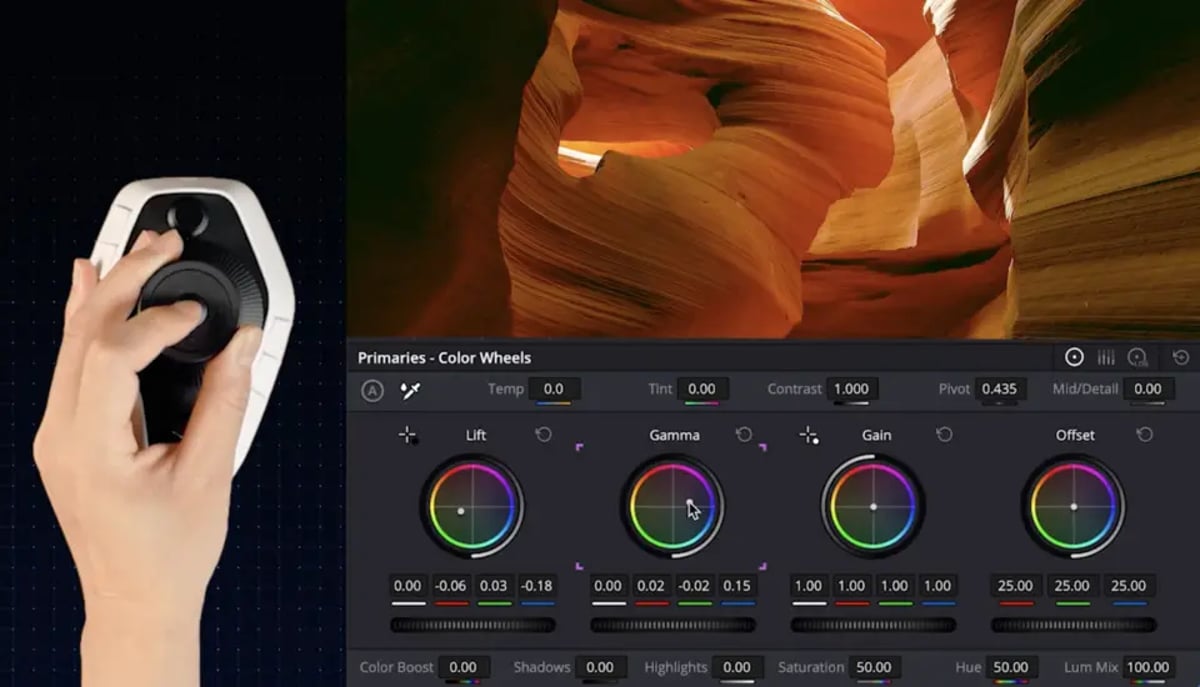
The introduction of new hardware to the post-production ecosystem always warrants attention from professional editors and colorists. XPPen, a company primarily recognized for its stylus displays and graphics tablets, has now entered the hardware controller market with the announcement of the Pilot Pro Editing Console. This 251g device is presented as a dedicated solution for photo and video editing workflows, aiming to offer a compact, ergonomically considered control surface for left-hand operation alongside a mouse. Priced at $209.99, the Pilot Pro combines an all-way joystick, three rotary dials, and a total of 19 buttons, positioning itself as a flexible contender in a space traditionally occupied by more specialized or higher-end solutions.
For years, dedicated editing consoles have been developed along two primary paths: those tightly integrated with specific software platforms, such as Blackmagic Design’s Resolve panels, and more application-agnostic devices that aim for broader compatibility, exemplified by the Loupedeck range. The Pilot Pro attempts to bridge this gap by offering out-of-the-box support for both DaVinci Resolve and major Adobe applications. This approach suggests a focus on the practical realities of many post-production environments, where editors frequently navigate between different software packages depending on project requirements or client preferences. The claim of an "industry-first" design by XPPen will be tested by practical application, but the feature set outlined provides a foundation for detailed examination.
A Centralized Joystick Design
Perhaps the most distinctive element of the Pilot Pro's layout is its all-way joystick, centrally mounted on the chassis. This joystick supports either 4- or 8-way directional input, a configuration more commonly associated with gaming peripherals than color grading or timeline navigation. XPPen states the joystick’s intended functionality includes nuanced color wheel adjustments without the need for modifier keys, variable-speed playback (activated by tilting left or right), clip selection (pushing up), and cutting functions (pushing down).
Located on top of the joystick are four ABCD touch buttons that facilitate switching between custom themes. A central 'OK' button engages a heads-up display, which provides real-time feedback on the current key mapping. The integration of a joystick for tasks like color correction or transport control introduces a departure from the conventional jog and shuttle wheels found on most professional editing surfaces. Whether this analog input can deliver the precision and tactile feedback demanded for critical tasks, such as fine-tuning color parameters or executing frame-accurate edits, remains a key consideration for editors accustomed to the established jog-wheel paradigm. The practical efficacy of this design decision will be a significant point of evaluation in real-world professional workflows when the device is put to the test.
Dials and Programmable Buttons for Granular Control
Beyond the central joystick, the Pilot Pro incorporates three distinct rotating components: a high-speed dial, a precision knob, and a rotary dial, each assigned specific functions designed to streamline editing operations. The largest of these, the high-speed dial, is purposed for rapid scrubbing through clips, enabling editors to quickly locate specific points within longer media files. The precision knob is engineered for more fine-grained adjustments, such as frame-by-frame playhead movement or precise image rotation, critical for compositing or detailed visual effects work. The rotary dial manages timeline zoom, allowing for quick adjustments to the visible section of the edit. All three dials are equipped with haptic feedback, delivered via a linear motor, offering three configurable vibration intensities (intense, gentle, or off), or the option to disable feedback entirely. Such tactile response can be beneficial for muscle memory and confirming actions without requiring visual confirmation, a feature often valued in fast-paced editing environments.
The console also features a complement of 12 freely assignable hardware keys beneath the joystick: eight command buttons and four directional buttons. When combined with the four ABCD touch buttons atop the joystick, the device offers a total of 16 customizable controls. XPPen indicates that these controls can support up to seven distinct custom themes, allowing for more than 100 mappable commands per setup. This level of programmability is crucial for professional users who often require extensive customization to match their idiosyncratic workflows and keyboard shortcuts across various applications. A single button can also be configured as a "command set," capable of triggering multiple actions sequentially or expanding into an on-screen panel of related shortcuts, further extending the customization possibilities. This tiered approach to control density, combining direct hardware buttons with software-driven command sets, aims to provide both immediate access to frequently used commands and deeper functionality for less common but equally important operations.
Software Integration and Community Support
A key aspect of any professional hardware controller is its integration with professional editing software. The Pilot Pro's design emphasizes cross-application compatibility, which is a practical necessity for many post-production specialists. By supporting leading platforms such as DaVinci Resolve and Adobe Creative Cloud applications from launch, XPPen is addressing a critical need for devices that can function effectively across diverse software ecosystems.
While the technical specifications detail the hardware capabilities, the efficacy of the Pilot Pro will ultimately depend on the maturity and flexibility of its accompanying software driver and utility. The ability to extensively customize button mappings, dial functions, and joystick behavior within specific applications is paramount for professional use. The announcement of a "community preset library" suggests an understanding that user-generated configurations often prove to be the most innovative and practical solutions for complex workflows. This model of community engagement, if properly managed, could foster a dynamic environment where professional users share and refine workflow-specific presets, improving the overall utility of the device for a broader range of tasks and individual preferences. This also highlights the importance of consistent software updates and ongoing driver development to ensure stability and compatibility with future software versions and operating system changes. The absence of comprehensive and regularly updated software can quickly render even well-designed hardware inadequate for the demanding pace of professional post-production. For example, maintaining software support for a device like this is as critical as the hardware itself, a lesson learned from numerous peripherals that have seen their utility diminish due to discontinued software development.
Connectivity, Battery, and Build Considerations
For a portable workstation or a fixed editing suite, the physical attributes of a control surface are just as important as its digital capabilities. The Pilot Pro, with its 251g (8.85 oz) weight, is designed to be lightweight, catering to editors who may need to move their setup between different locations or integrate it cleanly into tight desk spaces. The emphasis on left-hand operation positions it as an accessory to complement a primary mouse or pen input, aligning with typical ergonomic setups in post-production.
Details regarding wired versus wireless connectivity are crucial for professional workflows. Wired connections offer low latency and reliable power, which are often non-negotiable for real-time control, particularly during color grading or precise timeline navigation. Wireless options, while offering greater flexibility in desk arrangement, introduce variables like battery life and potential signal interference, which can be critical during a live editing session. Knowing the specifics of power delivery (e.g., USB-C power delivery, internal rechargeable battery capacity) and expected operational duration on battery would be essential for those considering its use in mobile or on-set editing scenarios. The build quality, materials used, and the tactile feel of the buttons and dials will also contribute significantly to the perceived professional utility and long-term durability of the device. Professional tools are expected to withstand extensive daily use, and details regarding chassis construction and component durability are important considerations for potential users.
Strategic Positioning in the Market
The editing controller market is not new. Blackmagic Design’s DaVinci Resolve panels, for instance, are highly specialized and deeply integrated for color grading, effectively acting as dedicated extensions of the software. On the other hand, products like the Loupedeck consoles offer a more generalized approach, aiming for broad compatibility across various creative applications. The Pilot Pro attempts to carve out its own niche by offering a feature set that includes a unique joystick input and broad software support at a competitive price point of $209.99. This pricing strategy positions it as a more accessible option compared to high-end dedicated systems, while aiming to offer more tactile control than a standard keyboard and mouse setup.
The success of such a device hinges not just on its initial feature set or price, but on its ability to truly enhance and streamline professional workflows. The emphasis on customizability, including multiple assignable buttons, dials with haptic feedback, and the potential for a community preset library, suggests XPPen understands the diverse needs of professional editors. However, the true test will be in how these features translate into tangible efficiency gains in day-to-day use. Will the joystick prove to be a precise and intuitive tool for colorists, or will it feel like a compromise compared to dedicated trackballs? Will the responsiveness of the dials and the reliability of the software integration stand up to the rigorous demands of deadlines and intricate project requirements? These are the practical questions that seasoned professionals will be asking. While devices designed to improve ergonomics and speed are always welcome, they must demonstrate real-world advantages over existing methods. Full specifications and configuration details are available on the official XPPen Pilot Pro product page. The announcement of the Pilot Pro presents an intriguing development for post-production specialists looking for new ways to optimize their craft, particularly for those who frequently switch between different NLEs and grading software.
---
© 2026 BlockReel DAO. All rights reserved. Licensed under CC BY-NC-ND 4.0 • No AI Training. Originally published on BlockReel DAO.