SmartLog Review: Free Camera Report App (2026)
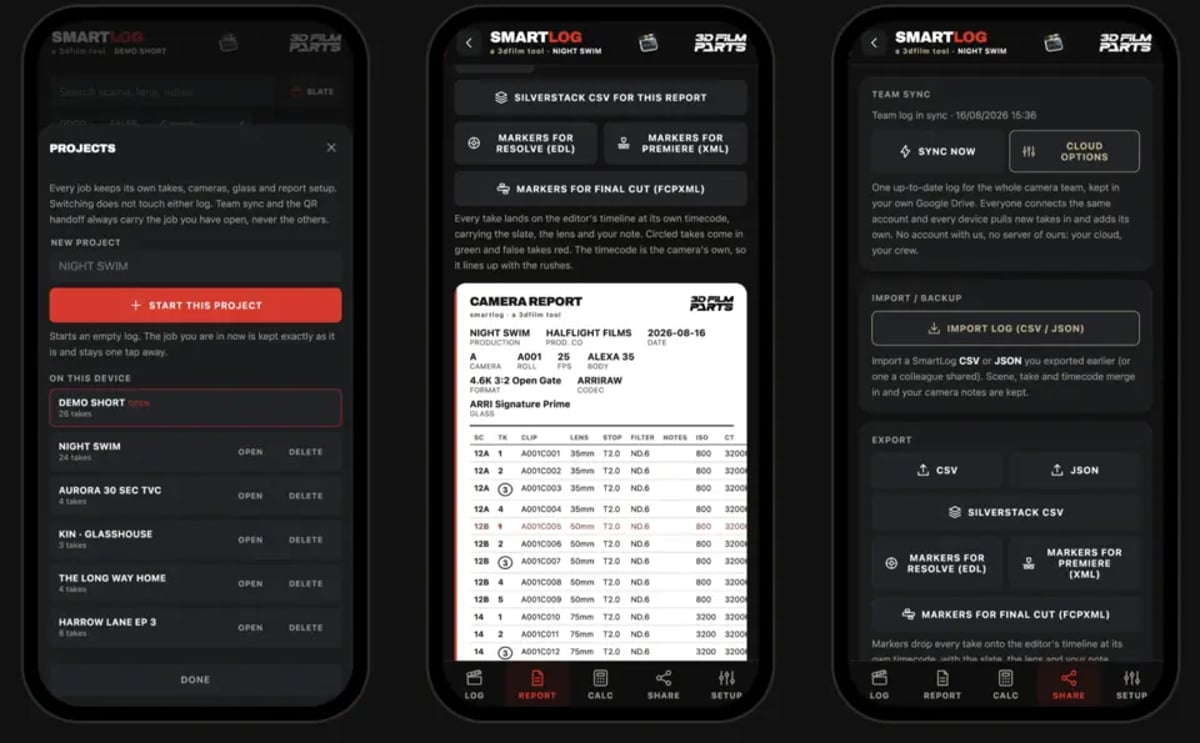
The day has enough moving parts. Chasing light, absorbing last-minute script revisions, keeping the crew fed and focused. The last thing anyone needs is a clunky logging workflow adding friction to the camera department. Which is why tools built by working crew, for working crew, are worth a close look. SmartLog is a free camera report app from 3D Film Parts, currently in open beta, built around on-set data capture.
This is not a shiny-new-tech piece. Camera reports have always been the unglamorous backbone of post. Editorial, VFX, and sound all depend on them, and they are usually the first thing to suffer on a fast-moving day. SmartLog goes at that problem directly.
The problem: data disconnect and manual labour
Consider the traditional camera report. Handwritten sheets, transcription errors, missed takes, and the slow work of cross-referencing notes from several people. Then the DIT's spreadsheet, the loader's logs, the 2nd AC's notes. When something goes sideways, and it does, hunting down accurate information burns hours in post. Anyone who has sat on a call with an editor trying to locate one specific take, or with a sound team asking which slate belongs to which clip, knows the cost. Good metadata is what keeps a schedule intact. Our guide on camera reports that help post covers the fields that actually matter downstream.
SmartLog's core promise: log takes as you shoot, and the finished report writes itself. The app runs offline, requires no account, and works on phone, tablet, or desktop. That open access matters for crew-level adoption, because nobody installs a paywalled tool at 5am on a call sheet day.
The developer publishes adoption numbers openly. As of August 2026, 3D Film Parts reports 3,090 downloads and launches across 51 public builds, with feature requests coming from working filmmakers and credited to them by name on a changelog anyone can read. That is a developer who reads their inbox.
A toolkit for the camera department
A camera report app has to do more than count takes. It needs precision, live calculation, and a clear picture of what was captured against what was planned.
SmartLog ships nineteen camera department calculators, including:
- Depth of field
The value of putting these inside the logging app is that a 2nd AC under pressure opens one screen, enters a few numbers, and gets an answer without leaving the log. The desqueeze and geometry tools in particular save time on scope days; if you are new to that format, our anamorphic filmmaking guide explains what those numbers are doing.
Beyond calculation, the app carries recording data for 87 camera bodies and 575 recording modes, transcribed from manufacturers' own documentation with the document, revision, page, and date recorded for each figure. ALEXA 35 ProRes rates, for example, come from ARRI's published figures rather than being scaled from a generic reference. For anyone sizing cards and drives, that accuracy feeds straight into media management planning and proxy workflow design.
Bridging the gap between logged and actual
The gap between what was supposed to be shot and what actually happened is a permanent feature of production. SmartLog reads the file list off the camera card, or imports a CSV from the DIT, then flags where the log and the media disagree. It finds the clip nobody logged, which is reliably the expensive one. Whose drive that file lives on, and who is accountable for it, is a separate conversation worth having in prep; see on-set data policy.
You can also paste in an existing shot list. The app then shows the planned setup next to the setup that was used, and frames the difference as "changed from plan" rather than "wrong." DPs swap lenses, directors pivot, plans move. A tool that treats that as normal gets used.
Timecode is handled with the same specificity. Take the common case: A camera is eight frames out from 13:42 until the 15:06 rejam, which traditionally means opening twenty-seven takes and retyping two timecodes into each one. In SmartLog you pick the camera, the range, and the offset, preview every take that would move, then apply. It is drop-frame aware and handles midnight crossovers correctly. If drift is a recurring problem on your sets, the fix usually starts upstream; our guide on timecode sync on set covers jam intervals and box discipline.
Integration and customisation
- Export compatibility: SmartLog writes Silverstack, Drylab, Resolve, Premiere, Final Cut, and master CSV files, and it prompts you to test that handoff on prep day rather than on day one. Testing a handoff before the shoot is the same discipline behind a good sound turnover checklist.
There is also direct support for the 3DFilmParts Digital Slate, which SmartLog can find over wifi, push scene and take data to, and jam timecode with. That switch stays off unless you own the hardware.
What it actually changes on the day
Anything that reduces friction on set is a win. A free tool of this depth lowers the barrier to disciplined data management on productions that cannot afford a full-time DIT, which is most of them. Our breakdown of DIT needs on indie films makes the same point from the budget side: the job still has to happen, the question is who does it and with what.
For sound, an accurate camera report means fewer calls to set and less guesswork at sync. For editorial, it is the difference between a clean assembly and a treasure hunt. When the report matches the media, the day ends earlier for everyone downstream.
The caveat worth stating: this is beta software, and it is a logging tool, not a backup strategy. It does not replace checksummed offloads, a written data policy, or a tested handoff to post. Use it for what it is good at, which is capturing accurate information at the moment it exists, once, in the place it happens.
That is the part most tools get wrong, and this one gets right.
---
© 2026 BlockReel DAO. All rights reserved. Licensed under CC BY-NC-ND 4.0 • No AI Training.