Cadrage Studio Launches: Pre-Production Suite Pricing
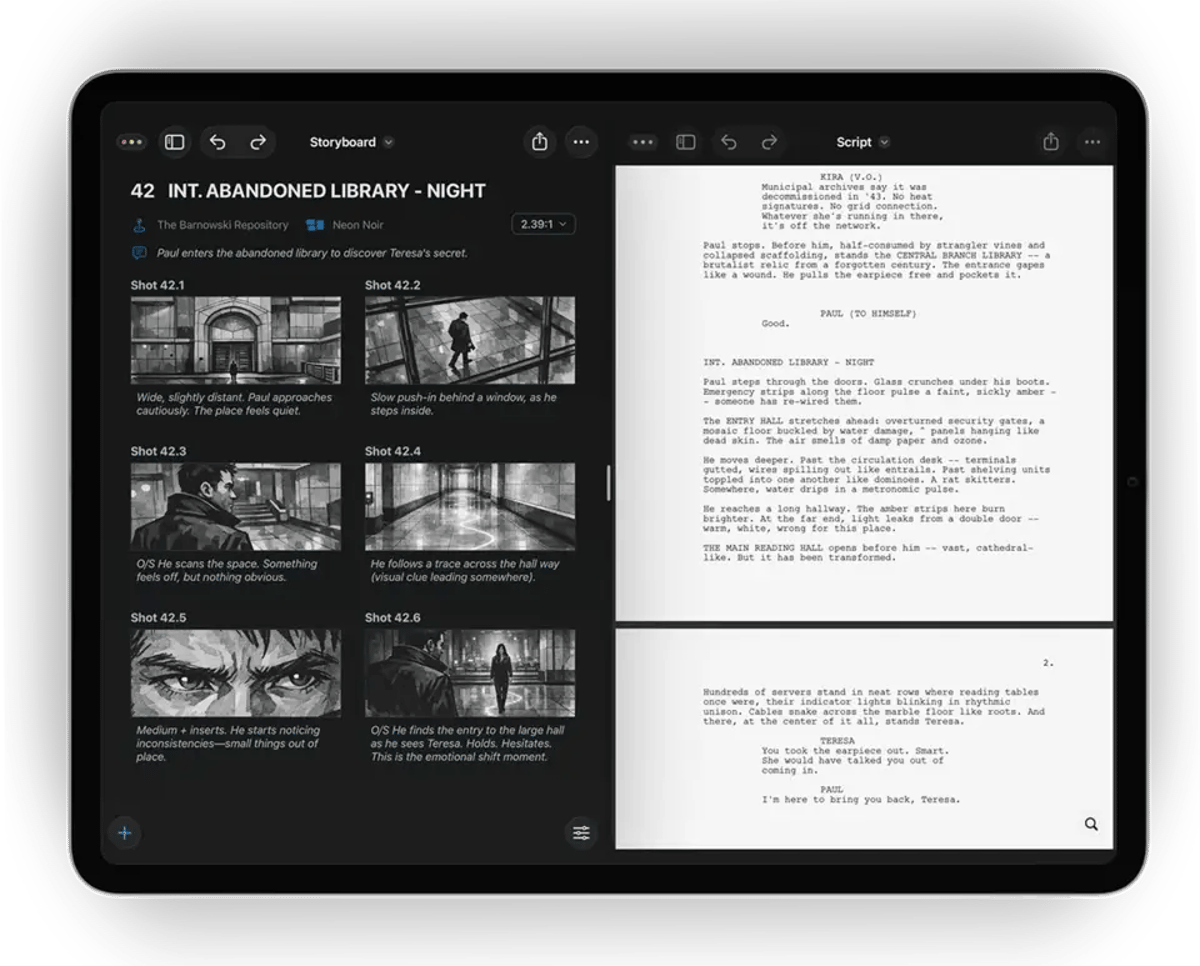
The landscape of pre-production tools for professional filmmakers continues to evolve, with Cadrage Studio officially transitioning out of its early access phase. Developed by Cadrage GmbH, the team behind the widely adopted Cadrage director's viewfinder app, this pre-production suite is now available on the App Store for macOS and iOS, leveraging a subscription-based model. For filmmakers deeply entrenched in planning features, commercials, and music videos, this full release signifies a consolidated approach to managing everything from shot lists to locations within a unified environment.
The official release marks the conclusion of a beta period that included deployment on multiple feature films and commercials, suggesting a robust foundation for production-level work. This isn't a speculative version 1.0; instead, it is a formal opening of doors for a tool that has already seen practical application in the field. The shift to a subscription model, priced at $19.99 per month or $99.99 per year, includes a free trial for new subscribers. This pricing structure demands consideration from productions budgeting for advanced pre-visualization tools.
From Viewfinder to Integrated Prep Suite
Cadrage GmbH has a decade-long history of developing tools for filmmakers, with their Cadrage director's viewfinder app becoming a standard for cinematographers and directors globally. With over 100,000 users, the app has undergone significant updates, including a ground-up redesign and the addition of video capture functionality. Cadrage Studio extends this core competency from solitary shot framing into a broader, integrated pre-production workflow.
The core ambition of Cadrage Studio remains consistent with its early access preview: to centralize the often fragmented elements of pre-production. This means moving beyond disparate folders, documents, and single-function applications. The suite aims to provide a native workspace across iPhone, iPad, and Mac, designed to streamline preparatory work. This approach aligns with a growing trend in the industry toward integrated platforms that facilitate collaboration and consistency in early-stage production planning, as evidenced by tools like Chemical Wedding's Artemis Studio for Mac.
The suite claims to adapt to a filmmaker's individual process, rather than dictating it, while ensuring that all preparatory work is organized for a clean handoff to other departments. This is a critical consideration for any pre-production tool, as the efficiency of a project often hinges on the clarity and accessibility of planning documentation across the entire crew.
The Script as the Central Axis
A key differentiating feature of Cadrage Studio is its script-centric architecture. Unlike generic project management software or even specialized tools that treat a script as just another file, Cadrage Studio integrates the script as the foundational element of the pre-production process.
Upon importing a script, the app automatically identifies scenes and characters. This initial parsing capability then informs how all subsequent pre-production elements are connected. Shot lists, camera diagrams, mood boards, and location details are all associated directly with their respective scenes. This connectivity is intended to maintain synchronicity even through script revisions, a common occurrence in any production cycle. Maintaining these connections manually across various document types can consume significant time and introduce errors. A system that automates this linking and update process could offer a meaningful improvement in efficiency.
Consider the complexity of managing shot lists and blocking diagrams with evolving script pages. Where a traditional workflow might involve manual updates across several documents, Cadrage Studio’s approach suggests a more fluid, interconnected system. This kind of integration is particularly useful when exploring different staging options during pre-production. For instance, visualizing how camera placements align with character movements in a specific scene can be iterative. If a scene description changes, the associated diagrams ideally update or at least flag inconsistencies. This level of granular control and interconnectedness, if executed effectively, can reduce the administrative burden of pre-production, allowing creative teams to focus on artistic decisions rather than document management.
This structured connection between script elements and visual planning components directly impacts departments beyond directing and cinematography. For the editorial team, having meticulously organized pre-production data, linked intrinsically to the script, provides a clearer roadmap for the intended narrative flow. While not an NLE unto itself, a well-structured set of pre-viz materials can directly inform the editor's approach to scene assembly and pacing, particularly in complex sequences. A clear, visual breakdown of shot intention, established in pre-production, can be invaluable during the assembly edit, providing insight into the director's initial vision long before principal photography begins. This transparency can minimize misinterpretations and streamline the post-production workflow, a perennial challenge in film production.
Locations, Mood Boards, and Collaboration
Beyond script integration, Cadrage Studio also provides functionalities for managing locations and mood boards. These elements are crucial for establishing the visual and atmospheric intent of a project.
- Location Management: The ability to link specific locations to scenes directly within the app provides a centralized repository for logistical and creative information. This could include technical specifications of a location, such as power availability or sound considerations, alongside visual references and permits. For cinematographers, having immediate access to location scouts' photos or 3D scans (as hinted by available images depicting 3D scans to floor plans) linked to specific scenes can be invaluable for early lighting and blocking discussions. Integrating floor plans and potentially 3D data directly can facilitate more precise camera placement and staging ahead of time.
- Mood Boards: Visual development is an integral part of pre-production. Compiling mood boards within the same application that houses the script and shot lists ensures that the aesthetic vision is consistently applied and readily accessible. This can range from color palettes and costume ideas to specific visual references that inform the overall look and feel of a scene or the entire project. For consistent visual storytelling, especially in projects with complex visual effects or intricate production design, having a dynamic and integrated mood board system is beneficial. It allows for a cohesive presentation of artistic intent to all departments, ensuring everyone is working from the same visual lexicon.
The overarching design philosophy appears to be one of collaborative access. By housing all these disparate pre-production elements within a single platform accessible across multiple Apple devices, Cadrage Studio could facilitate smoother communication across departments. This is particular important in today's distributed production environments, where creative teams might be spread across different geographical locations. A shared, real-time workspace for pre-production materials can significantly reduce communication overhead and improve decision-making accuracy.
Privacy by Design and No AI Training
In an industry increasingly concerned with data security and intellectual property, Cadrage GmbH has highlighted "Privacy by Design" as a core principle for Cadrage Studio. Crucially, the company states that user data is not used for AI training. This is a significant point of differentiation in a market where many software solutions, particularly those leveraging cloud infrastructure, implicitly (or explicitly) reserve the right to use user data for machine learning improvements.
For professional filmmakers, especially those working on high-value projects, the assurance that their creative work, including unproduced scripts, shot lists, and visual concepts, will not be ingested into AI models is a major factor. The concerns around AI and intellectual property have been a recurring theme in recent industry discussions, impacting creative rights and compensation models. A clear stance on no AI training could position Cadrage Studio favorably among productions wary of potential IP exploitation via software. This commitment to data privacy directly addresses a growing apprehension within the creative community regarding proprietary information and generative AI.
The broader implications of AI in post-production are still being debated, with many professionals acknowledging its potential for efficiency in areas like rotoscoping or transcription while maintaining a cautious stance on its creative applications. Tools that expressly avoid using creative data for AI training align with a desire for human-centric creative control. For those working with sensitive or confidential material, this feature may be a deciding factor in tool selection.
Price and Availability
Cadrage Studio is now officially available through the App Store, having exited its early access phase. It is offered on a subscription basis:
- Monthly Subscription: $19.99
A free trial is available for new subscribers, allowing potential users to evaluate the suite's capabilities before committing financially. Distributing via the regular App Store, rather than TestFlight, signifies that Cadrage GmbH considers the application production-ready.
The subscription model itself is a common practice for professional software today, providing continuous development, updates, and support. However, for smaller productions or independent filmmakers operating on limited budgets, recurring costs for software can accumulate. The decision to adopt a subscription model for a pre-production utility reflects broader industry trends but will require filmmakers to factor this into their planning budgets. Historically, filmmaking software often involved perpetual licenses, but the shift to subscriptions like Adobe Creative Cloud or DaVinci Resolve Studio (with its optional subscription for cloud features) is now the norm.
The availability across macOS and iOS devices speaks to the mobile-first nature of much pre-production work today. Directors and cinematographers frequently need to review or update plans on set, during location scouts, or in transit. Ensuring seamless functionality and data synchronization across iPhones, iPads, and MacBooks provides the flexibility required in dynamic production environments. This multi-device accessibility aims to ensure that creative vision and logistical planning are continually in sync, regardless of the user's location.
For post-production specialists, efficient pre-production contributes significantly to a smoother path through editorial. Accurate, well-organized shot lists and visual plans from a tool like Cadrage Studio can minimize ambiguities during the edit, potentially reducing the need for costly reshoots or extensive workaround solutions. When combined with tools that streamline onset data management, a robust pre-production suite forms a critical link in the entire production chain. The integration offered by Cadrage Studio, particularly its script-centric approach, has the potential to influence how effectively creative intentions are translated from concept through to the final cut.
---
© 2026 BlockReel DAO. All rights reserved. Licensed under CC BY-NC-ND 4.0 • No AI Training.