LIGHTFRAMER PRO Review: Sun-Tracking iPhone Cinema Viewfinder
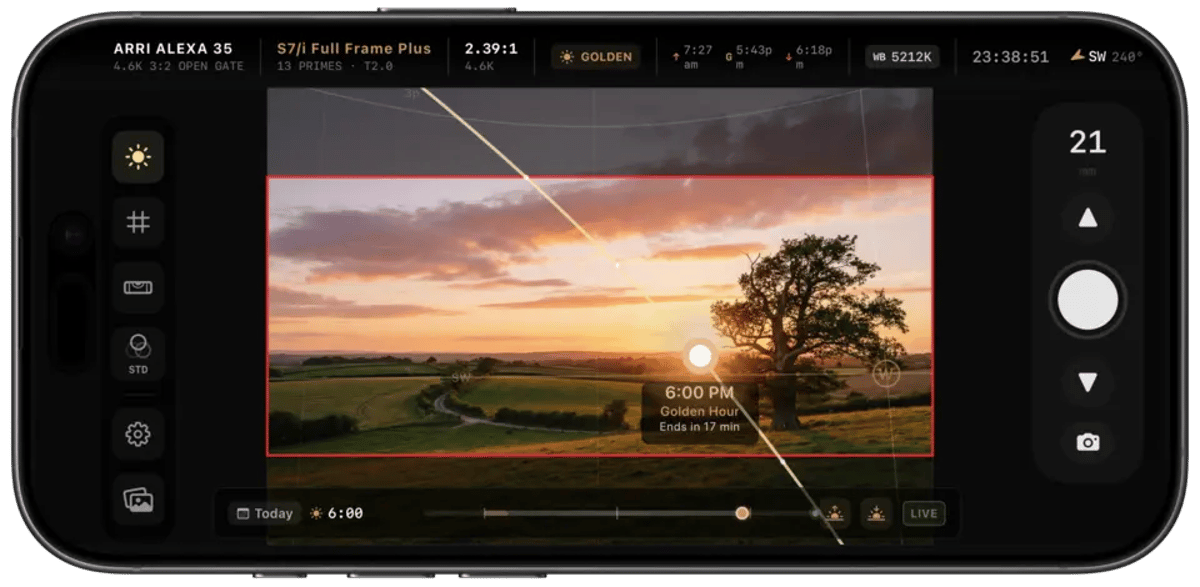
We've all been there: out on a scout, trying to juggle a director's viewfinder, a separate sun path app, and maybe a rangefinder, all while attempting to visualize how the actual camera package will sit in the space. It's a multi-tasking dance that, while fundamental to pre-production, can be clunky. LIGHTFRAMER PRO, a new iPhone application from developer Eric Hernandez, consolidates several critical scouting tools into a single interface, offering cinematographers and directors a more integrated approach to pre-visualization.
The app's primary distinction is its blending of traditional digital director's viewfinder functionalities with real-time sun tracking. Then it adds LiDAR-based focus tools and the ability to export structured PDF scout documents. For professionals constantly evaluating locations against a technical checklist, this kind of consolidation could shorten a considerable portion of the initial legwork. If you want the broader context on how scouts are organized end-to-end, our location scouting and management guide covers the workflow this app plugs into.
Integrated Camera and Lens Framing
At its core, LIGHTFRAMER PRO functions as a full digital director's viewfinder. This isn't a novel concept, of course, but the depth of its camera and lens database is notable. The app lets users select from 50+ cinema camera bodies, 90+ lens series, and more than 500 focal lengths. Supported brands include ARRI, RED, Sony, Canon, Blackmagic Design, and optical manufacturers such as Cooke, ZEISS, Panavision, and Sigma. The 1.0.3 update also added 50+ Panavision series, Zero Optik rehoused vintage glass, DZOFilm Arles and probe lenses, Hawk and Panavision anamorphics, and Thypoch Simera-C, among others.
For a cinematographer needing to quickly assess how a specific camera and lens combination will render a scene, this level of detail matters. You can dial in the precise camera model, choose from a wide array of lens options, and then overlay specific recording formats and frame lines onto the iPhone's live view. This allows for immediate visual feedback on composition and coverage, helping answer questions like:
- Will this 35mm on a Super 35 sensor achieve the desired field of view?
While an experienced DP can often make these judgments by eye, a precise digital tool that simulates the exact technical parameters of the intended gear package reduces guesswork. It means clearer communication with the director and production designer during those critical early stages. Filmmakers wanting to go deeper on this stage of prep should read our lens selection guide for cinematographers.
Real-Time Sun Tracking in the Viewfinder
Perhaps the most compelling feature of LIGHTFRAMER PRO is its real-time sun tracking integrated directly into the viewfinder feed. Traditionally, location scouts involved external tools or apps (like Sun Seeker or Helios) to predict the sun's path, then cross-referencing that information with the actual scene. This app overlays the sun's position and trajectory directly onto the live image.
This is a meaningful workflow shift. Instead of mentally translating data from a sun path diagram to the physical space, you can hold up your iPhone and see exactly where the sun will be at any given time of day, depicted within your potential frame. Users can scrub through a virtual timeline of the day, observing how the light will shift from sunrise to sunset, tracking golden and blue hours. The 1.0.3 "Shadow Map" view layers this onto a streets-first basemap with 3D buildings and color-coded time indicators (harsh, soft, golden), then exports a shadow map card with sunrise, sunset, and golden hour windows.
Consider the practical implications for a cinematographer or gaffer:
- Backlight considerations: Quickly determine if the sun will be directly behind talent at a critical moment, requiring specific diffusion or fill strategies.
This real-time visualization can save hours (or days) of planning and potential reshoots by providing accurate, in-context environmental lighting data. It uses augmented reality to inform decisions before the trucks even roll.
LiDAR-Based Focus Tools
For iPhone and iPad models equipped with LiDAR (Pro and Pro Max models from iPhone 12 Pro onward, and recent iPad Pros), LIGHTFRAMER PRO extends its utility with LiDAR-based focus tools. The 1.0.3 update introduced a "Focus Heatmap" that visually represents depth of field, acceptable focus, and hyperfocal distance based on the selected camera and lens, alongside minimum focus distance per lens.
This goes beyond simply measuring distance with a laser. By visualizing depth of field in real time, cinematographers can:
- Confirm focus pulls: Pre-determine the approximate range an AC will need to pull focus for a given shot.
Understanding acceptable focus is one thing on paper, but seeing it overlaid onto the live environment can provide a much clearer picture of what's achievable with the chosen optics and sensor. This capability, in concert with the framing tools, provides a more comprehensive pre-visualization of the final image.
PDF Scout Documents
The final piece of the workflow puzzle LIGHTFRAMER PRO addresses is documentation. Anyone who's managed a location scout knows the chaos of disparate photos, handwritten notes, and rough sketches. The "PDF Album Export" feature lets users generate presentation-ready PDFs directly from their scout albums. Each frame includes camera, lens, focal length, aspect ratio, GPS, time, and sun data; shadow map captures are grouped with full-day sun timing.
This brings order to the scouting process. Rather than sending a folder of unannotated images or trying to verbally describe the intended camera setup for each shot, a structured PDF can communicate precise details to the entire crew:
- Clearer communication with the director: The director can see the exact framing envisioned for each location.
This standardized output means less interpretation across departments and more efficient preparation. For teams formalizing this stage, our walkthrough on running a tech scout that prevents 50% of on-set problems pairs naturally with what LIGHTFRAMER PRO is exporting.
The Broader Context of Digital Scouting Tools
The emergence of apps like LIGHTFRAMER PRO speaks to a larger trend in filmmaking: the increasing reliance on digital tools to enhance pre-production and on-set efficiency. While there will always be a place for the tactile experience of a physical director's viewfinder and the experienced eye of a seasoned cinematographer, these digital aids offer real advantages in data synthesis and communication.
The ability to rapidly swap between camera and lens simulations, predict sun positions, and visualize depth of field, all within a single device, mirrors the push for integrated systems across the industry. It sits alongside a wave of phone-based cinematography utilities, as we covered in our look at the Exposimeter app as a virtual light meter. LIGHTFRAMER PRO is a paid app at $19.99 (USD) on the App Store, requires iOS or iPadOS 17.0 or later, and runs on iPhone and iPad. While a mobile device will never fully replicate the experience of looking through an optical viewfinder or the tactile feedback of a physical lens, the utility for rapid, data-rich pre-visualization positions LIGHTFRAMER PRO as a serious contender for a permanent spot in a professional filmmaker's digital toolkit.
---
© 2026 BlockReel DAO. All rights reserved. Licensed under CC BY-NC-ND 4.0 • No AI Training.